


.avif)

- AutoRFP.ai is an AI-powered RFP response tool that auto-fills questionnaires from a connected knowledge base; pricing starts at $500–$800/month for small teams and is quote-based for enterprise
- Does not publish public pricing; actual cost climbs once onboarding, integrations, and content library maintenance are factored in
- Best suited for teams with high RFP volumes and a dedicated content owner who can maintain the knowledge base over time
- Limitation: like other library-based tools, responses do not pull live deal context from CRM or call recordings, so outputs may not reflect what was learned in discovery
- SiftHub is presented as an alternative for teams where the core challenge is disconnected deal context, offering role-specific views, pre-call prep, and collateral built from live CRM and call data
- AutoRFP.ai is an AI-powered RFP response tool that auto-fills questionnaires from a connected knowledge base; pricing starts at $500–$800/month for small teams and is quote-based for enterprise
- Does not publish public pricing; actual cost climbs once onboarding, integrations, and content library maintenance are factored in
- Best suited for teams with high RFP volumes and a dedicated content owner who can maintain the knowledge base over time
- Limitation: like other library-based tools, responses do not pull live deal context from CRM or call recordings, so outputs may not reflect what was learned in discovery
- SiftHub is presented as an alternative for teams where the core challenge is disconnected deal context, offering role-specific views, pre-call prep, and collateral built from live CRM and call data
AutoRFP.ai is an AI-powered RFP response tool that helps sales and presales teams auto-fill questionnaires from a connected knowledge base. Pricing starts around $500–$800/month for small teams, scales with seat count and features, and is quote-based for enterprise. Most teams see time savings within the first few weeks, but costs can climb once you factor in onboarding, integrations, and content library maintenance.
If you're evaluating AutoRFP.ai or wondering whether it's worth the price, this guide covers what you actually need to know.
What pricing does AutoRFP.ai offer?
AutoRFP.ai does not publish a public pricing page. Based on reported market rates and user reviews, here's what teams are seeing in 2026:
Pricing is typically structured on a per-seat or per-user basis, with additional charges for integrations, custom templates, or dedicated support.
Costs to watch out for
The headline price rarely tells the full story. Before you sign, ask vendors about:
- Content library maintenance fees: AutoRFP.ai requires an active person to manage and update your answer library. If answers go stale, auto-fill accuracy drops, and that can mean more manual review time, not less.
- Integration costs: Connecting to your CRM, Gong, or SharePoint often requires a higher tier or custom work.
- Onboarding and implementation: Many teams report 4-8 weeks to get the library in a usable state. That's real internal time, even if the software itself is ‘ready.’
- Per-project or per-response overages: Some plans cap the number of RFP projects per month. High-volume quarter? You may hit limits.
- Annual commitment discounts vs. monthly flexibility: AutoRFP.ai, like most point solutions, offers better pricing on annual contracts, but that limits your ability to switch if adoption is low.
The honest question to ask: What's the true cost once you include the hours your team spends maintaining the library, reviewing AI outputs, and chasing SMEs? For many teams, that math significantly changes the ROI calculation.
What are user reviews for AutoRFP.ai?
G2 ratings and highlights
Overall G2 rating: 4.9/5 (February 2026)
Note: G2 reviews skew toward early adopters and smaller teams (under 50 employees) managing moderate RFP volumes. Enterprise user experiences reveal different patterns.
The positives
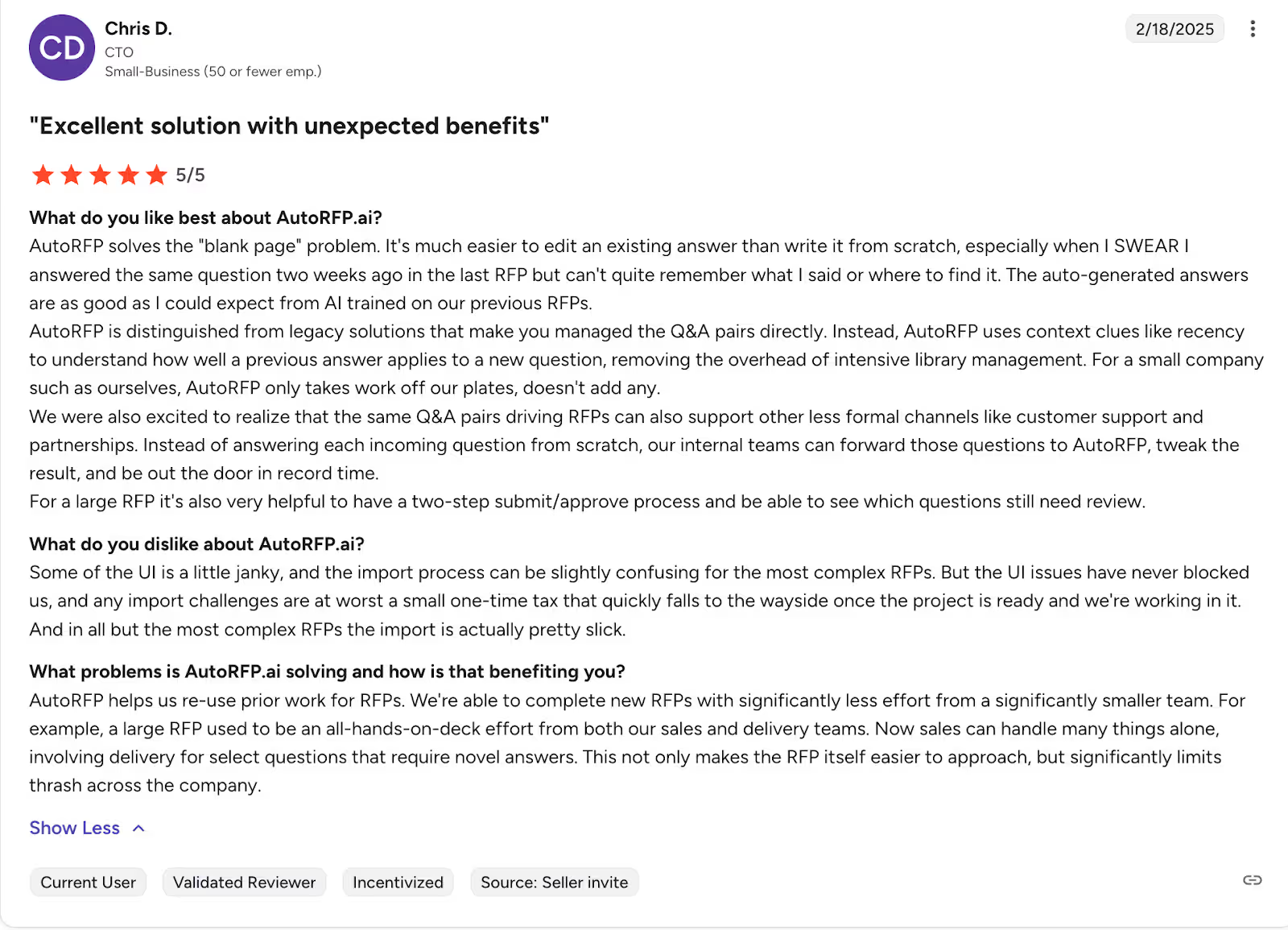
This is what Chris, who’s the CTO for a small business, has to say about AutoRFP.ai:
Recurring complaints and limitations
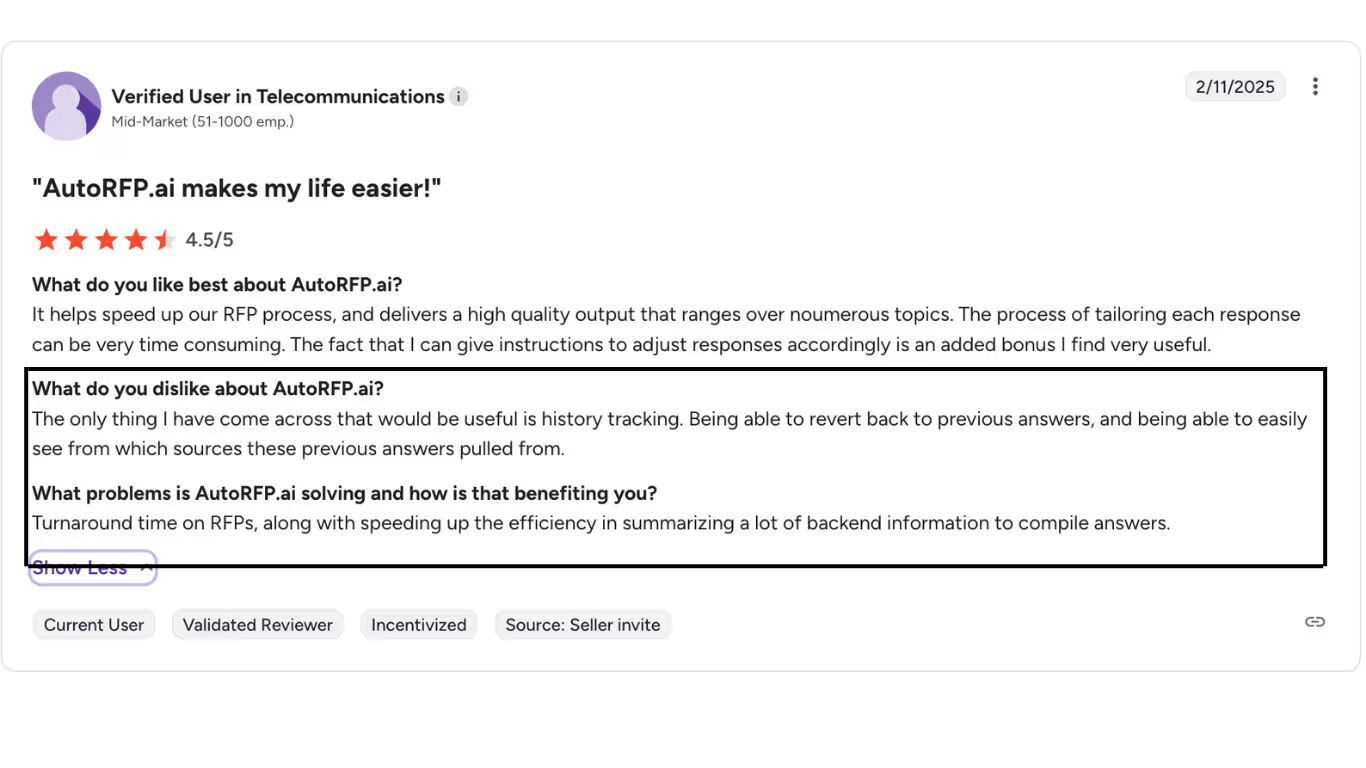
A mid-market verified user in telecommunications had difficulty identifying the sources of answers or tracking the previous response history. They also had issues with turnaround times and efficiency.
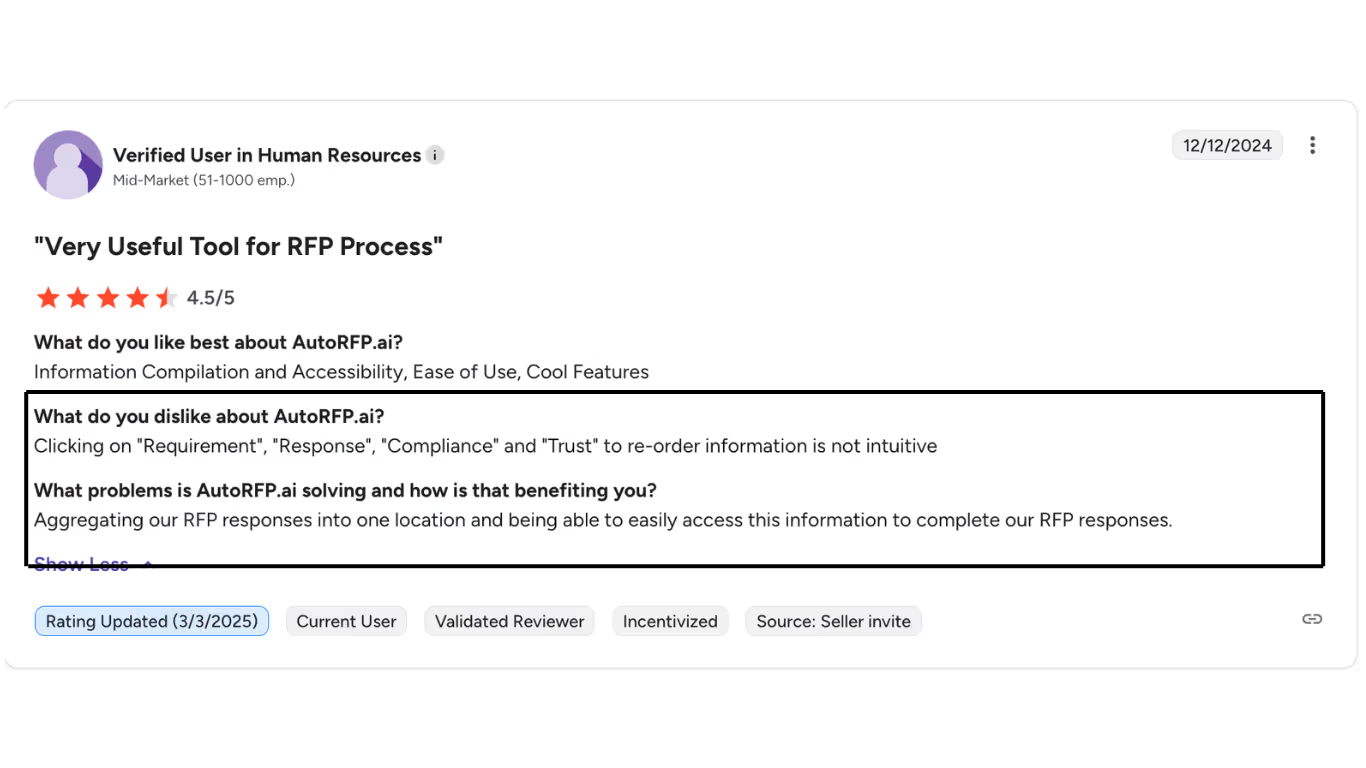
Another verified user from a mid-market space had issues with knowledge accessibility
User satisfaction by company size
Pattern: Satisfaction correlates inversely with organizational complexity. Smaller teams appreciate simplicity; larger teams outgrow constraints.
Features of AutoRFP.ai
AutoRFP.ai is purpose-built for RFP response and questionnaire automation. Core capabilities include:
- Auto-fill from knowledge base: matches incoming questions to stored answers, typically achieving ~60% fill rates on well-maintained libraries.
- Q&A library management: central repository for approved answers, manually organized by category and tag.
- Collaboration workflows: task assignment, SME routing, and comment threads within projects
- Multi-format support: works with Word, Excel, and PDF questionnaires
- Version control: tracks edits and maintains answer history
- Basic integrations: connects to SharePoint, Google Drive, and some CRM platforms
What AutoRFP.ai does not do: it doesn't generate content from call transcripts, it doesn't build pre-call briefs or deal summaries, and it doesn't pull live context from your CRM to tailor answers to a specific buyer.
AutoRFP.ai pros and cons
When AutoRFP.ai works well: Teams running 5–20 RFPs per month with a dedicated content owner and well-organized existing answers.
When it breaks down: Teams that need the tool to connect dots across deal context, or where no one has bandwidth to maintain the knowledge base, often find themselves back to manual work within a few months.
What is the implementation and setup process for AutoRFP.ai?
AutoRFP.ai implementation typically runs 4–8 weeks. Here's what to expect:
Week 1–2: Content migration. You'll need to import your existing Q&A pairs, clean up duplicates, and tag answers by category. This is the most time-intensive phase, and the one most often underestimated.
Week 2–4: Integration setup. Connecting to your document sources (SharePoint, Google Drive) and CRM takes technical lift. Native integrations are limited; some teams rely on exports rather than live connections.
Week 4–6: Pilot testing. Run 2–3 live RFPs through the system. Expect to discover gaps in your library during this phase. Answer quality varies significantly depending on the thoroughness of the initial import.
Week 6–8: Team adoption. The tool is only as good as the reps using it. Allocate a training budget and expect a period when manual review will remain heavy.
Ongoing: Assign a content owner. Without someone actively updating answers, accuracy degrades over time. This is the ongoing cost that most evaluations don't account for upfront.
SiftHub vs AutoRFP.ai
AutoRFP.ai helps you respond to RFPs faster. SiftHub goes further; it connects the RFP to the rest of your deal, so the context your team gathered in discovery actually shows up in the response. Instead of pulling from a static library, SiftHub reads your CRM, call recordings, and emails to generate responses that reflect what this specific buyer actually cares about.
1. Live deal context vs. static library
AutoRFP.ai generates answers from a knowledge base that must be built and maintained. SiftHub connects to your live GTM stack: Gong, Salesforce, Google Drive, Slack, and pulls context from actual deal history when drafting responses.
- Answers reflect the buyer's industry, use case, and deal stage
- No library to build, tag, or maintain
- Auto-fill rates of 70–90% from connected, always-current knowledge
What you get: RFP responses that sound like your best rep wrote them for this deal, not like someone copied and pasted from a content folder.
2. Full deal orchestration vs. RFP-only
AutoRFP.ai starts and ends at the questionnaire. SiftHub manages the entire deal cycle, from pre-call prep to RFP response to post-deal handover, automatically triggered by deal signals.
What you get: One platform that works across the entire deal, not just the window where an RFP lands.
3. AI that understands the RFP, not just answers it
AutoRFP.ai matches incoming questions to stored answers. SiftHub reads the full intake document, including appendices, buried requirements, and deadline references scattered across pages, and generates a structured checklist of milestones, mandatory submissions, and recommended attachments before drafting begins.
- AI Suggestions decode the full scope of the RFP automatically
- Smart document recommendations pull the right attachments from your knowledge base
- One-click task creation with owners and due dates from the intake docs
- Executive summary with deal context, competitors, key risks, and instructions, ready for alignment or handoff
What you get: Less time hunting for requirements. More time submitting a response that's actually complete.
Key features of SiftHub
RFPs: Reads intake documents, generates structured checklists, and auto-fills 80-90% of responses from your live, connected knowledge. Source attribution on every answer. Works natively in Google Sheets/Docs and Microsoft Excel/Word, no import/export loops.
Project tasks: Purpose-built RFP workflow management, including document submissions, milestone tracking, and submission coordination in one place. Assign owners, set due dates, leave comments, and move files to your submission checklist with one click.
Deal brief builder: Auto-generated briefs for every opportunity, pulling from calls, emails, Salesforce, and enablement content. Role-specific views for AEs, SEs, CS, and leadership. Pre-call prep and handover docs are created automatically when deal signals trigger them.
Sales collateral builder: Tailored collateral around solution stories, battlecards, proposals, and POV decks generated from live CRM and call data, not generic templates.
Enterprise-grade security: SOC 2 Type II, ISO 27001, and VAPT certified. Granular RBAC, SSO, full audit trails, and region-aware data residency for healthcare, BFSI, and regulated industries.
Choosing SiftHub over AutoRFP.ai
AutoRFP.ai is a capable tool for teams that run high RFP volumes and have a dedicated content owner. If your challenge is bigger, disconnected deal context, reps piecing together information from Slack the night before a call, or RFP responses that don't reflect what you learned in discovery, SiftHub is built for that.
Book a SiftHub demo.