.avif)

- Best suited for large enterprises with a dedicated proposal team and existing content library; less ideal for teams wanting AI that works beyond RFP auto-fill -
- Qvidian is an enterprise RFP and proposal automation platform with opaque pricing starting at $15,000-$25,000/year for the base license, with real costs significantly higher
- User reviews highlight slow implementation timelines, heavy admin overhead to maintain the content library, and limited native CRM/deal context integration
- Qvidian's AI uses keyword-based answer matching from a maintained library; it does not read the full RFP document or pull live deal context from CRM and calls
- SiftHub is positioned as an alternative that connects to live GTM data (CRM, calls, Slack) and reads the full RFP document to generate more contextually accurate responses
- Best suited for large enterprises with a dedicated proposal team and existing content library; less ideal for teams wanting AI that works beyond RFP auto-fill -
- Qvidian is an enterprise RFP and proposal automation platform with opaque pricing starting at $15,000-$25,000/year for the base license, with real costs significantly higher
- User reviews highlight slow implementation timelines, heavy admin overhead to maintain the content library, and limited native CRM/deal context integration
- Qvidian's AI uses keyword-based answer matching from a maintained library; it does not read the full RFP document or pull live deal context from CRM and calls
- SiftHub is positioned as an alternative that connects to live GTM data (CRM, calls, Slack) and reads the full RFP document to generate more contextually accurate responses
Qvidian is an RFP and proposal automation platform built for large enterprises. Pricing starts at roughly $15,000–$25,000 per year for a base license, but the real cost is far higher once you factor in the headcount, professional services, and AI add-ons required to keep it running. This guide breaks down Qvidian's costs, user feedback, and where a newer generation of tools does the job faster.
What pricing does Qvidian offer?
Qvidian's pricing is enterprise-custom and opaque. The vendor does not publish a public rate card. Based on buyer accounts and third-party review data, most organizations pay between $15,000 and $25,000 per year for the base license, with actual spend climbing significantly from there depending on team size, feature tier, and the extras below.
The enterprise custom model
Qvidian targets large-scale operations, banks, healthcare systems, and government contractors, where RFP volume is high, and a dedicated bid desk already exists. The pricing model reflects that: custom quotes, multi-year contracts, and negotiated tiers. If you're a mid-market team without a full-time proposal manager, you'll likely find the entry cost hard to justify before you've even logged in.
The internal maintenance cost
The license fee is only one part of Qvidian's costs. The platform is built around a content library that someone has to build, organize, and maintain. That someone is typically a full-time proposal manager or content administrator. Industry benchmarks suggest that organizations running Qvidian at scale dedicate 0.5–1 FTE just to content governance.
At a fully loaded salary of $70,000–$90,000, the hidden cost can exceed the cost of the software license itself.
Costs to watch out for
- Paid AI add-ons: Qvidian's core product predates the generative AI era. AI Assist features, including smarter answer matching and suggestion-based autofill, are frequently offered as upgrades rather than included in the base tier.
Buyers should confirm what's included at their contract level before assuming AI functionality is available out of the box.
- Consulting and implementation fees: Migrating your existing proposal content into Qvidian's folder structure is rarely a DIY exercise. Most deployments involve paid professional services engagements to help structure the library, train the team, and handle the data migration.
These fees are separate from the license and can add several thousand dollars to the first-year cost. - Training costs. Qvidian runs its own training program, sometimes referred to internally as ‘Qvidian University’, to onboard new users. While some materials are included, extended training for larger teams can incur additional fees.
What are user reviews for Qvidian?
G2 reviews for Qvidian indicate incompatibility with modern enterprise teams. It still struggles as legacy software.
Exhibit A: A verified enterprise user has compared it to a paperweight rather than a teammate who moves things faster for them.
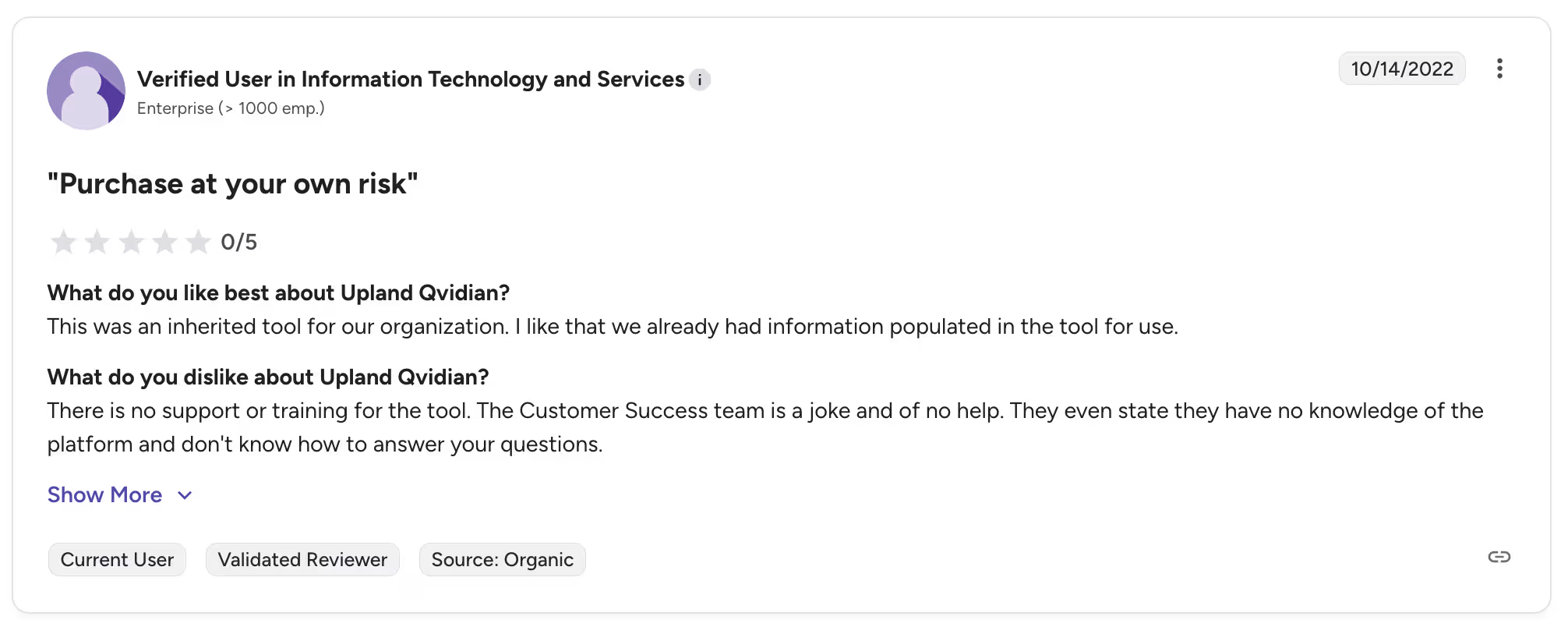
Exhibit B: A verified user in financial services talks about the time it takes to find relevant information in the software.
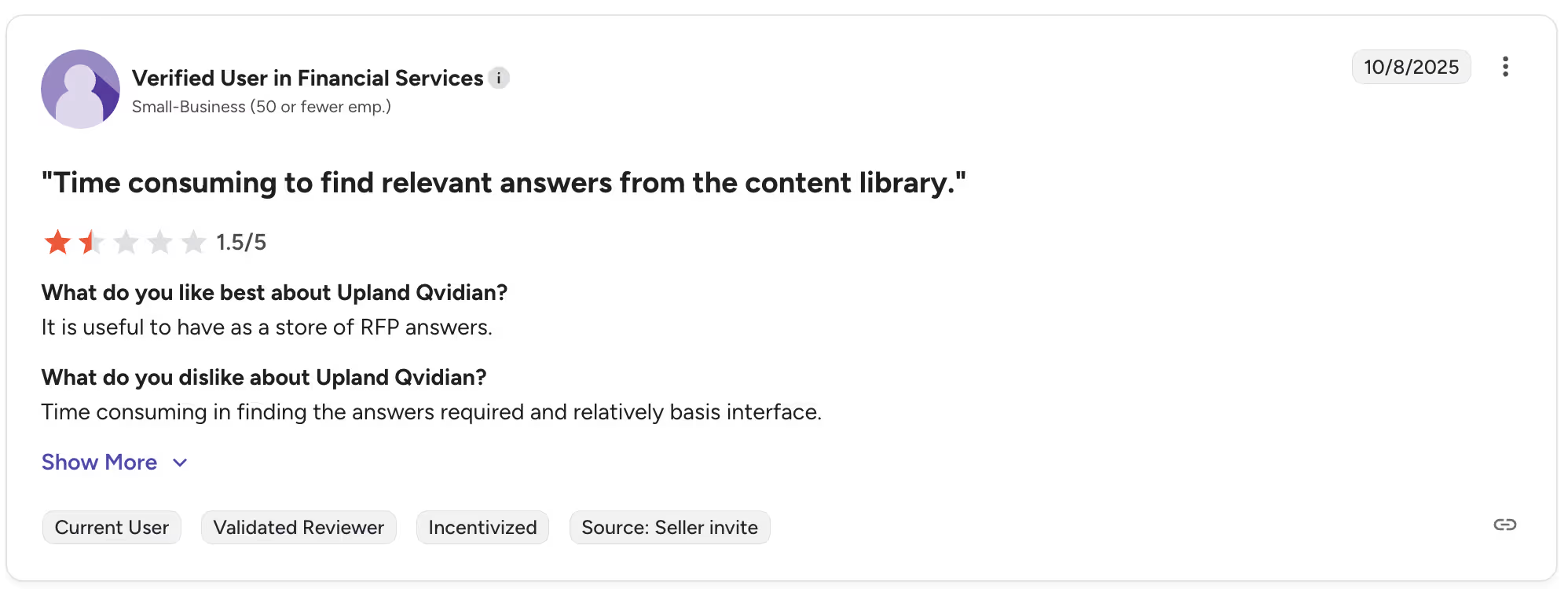
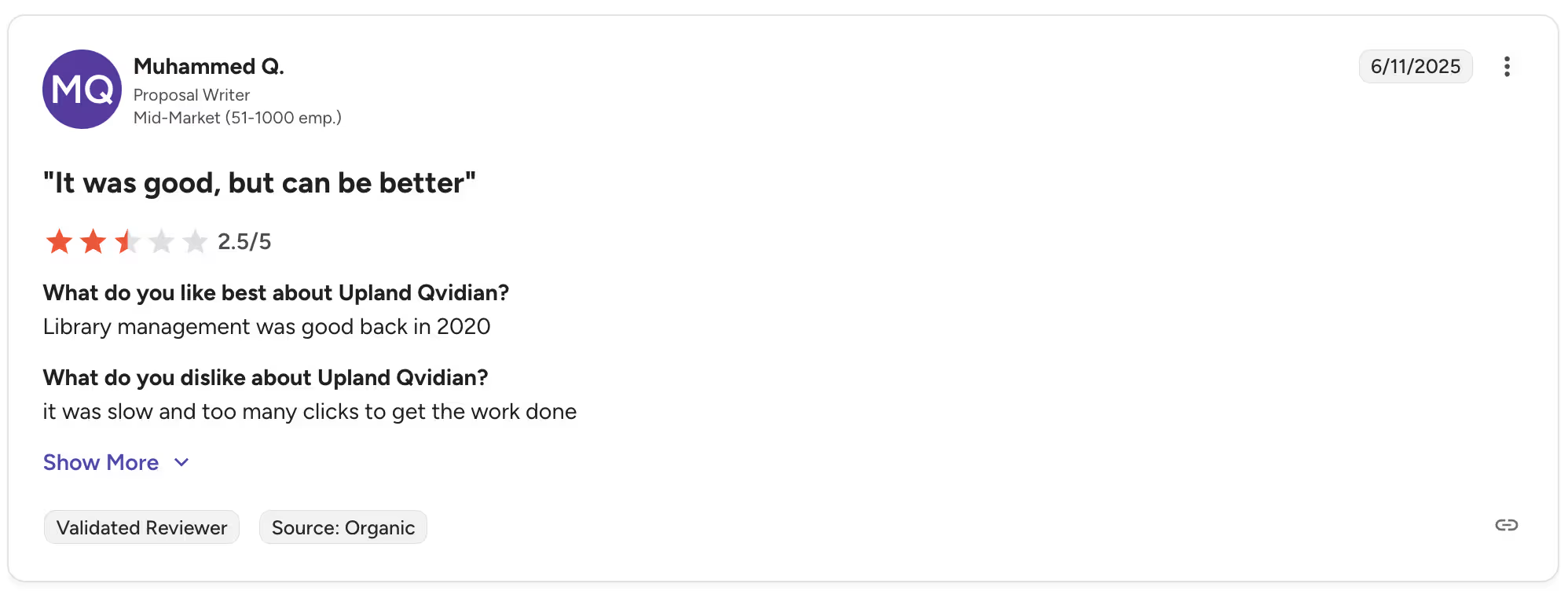
Exhibit C: A proposal writer who works for a mid-market company faces problems with library maintenance and how slow the software is.
Features of Qvidian
Qvidian is purpose-built for enterprise RFP response and proposal automation. Core capabilities include:
- AutoFill from content library: Matches incoming questions to stored answers using keyword-based retrieval, with fill rates varying significantly depending on library quality and maintenance cadence.
- Multi-level content library: Central repository for approved answers, organized into a hierarchical folder structure with tags, categories, and approval workflows.
- Collaboration and routing: Task assignment, SME routing, comment threads, and approval chains within projects, designed for bid teams with defined review processes.
- Multi-format support: Works with Word, Excel, and PDF questionnaires via desktop plugins.
- Version control and audit trails: Every edit is logged with the author and timestamp, making it suitable for regulated industries that require compliance documentation.
- Integrations: Connects to Salesforce, SharePoint, and select CRM platforms; primary workflow lives in Word and Excel plugins.
What Qvidian does not do: it doesn't generate content from call transcripts, it doesn't build pre-call briefs or deal summaries, and it doesn't pull live context from your CRM to tailor answers to a specific buyer. The knowledge base only reflects what someone manually entered, and only as recently as the last update.
Qvidian pros and cons
When Qvidian works well: Large enterprises with a dedicated Proposal Manager or full bid desk, high RFP volume (50+/month), and the bandwidth to invest in a multi-month library setup.
When it breaks down: Teams without a full-time content owner, organizations that need answers tailored to specific contexts, or anyone expecting to be productive within weeks rather than months.
What is the implementation and setup process for Qvidian?
Qvidian implementation is a months-long project, not a product onboarding. The typical process looks like this:
- Discovery and scoping with the Qvidian professional services team
- Content audit cataloguing existing proposals, past answers, and source documents
- Library architecture designing the folder taxonomy and content categories
- Migration ingesting legacy content into the new structure
- Team training via Qvidian University (role-specific modules for Proposal Managers, contributors, and reviewers)
- QA and testing before go-live
The total timeline for most enterprise deployments is 3–6 months. Some buyers report delays when migration volumes are high or internal stakeholders aren't aligned on the library structure.
This is a meaningful investment, and it front-loads all the effort before anyone has submitted a single RFP using the new system.
The contrast with modern onboarding. AI-native platforms like SiftHub take a different approach: connect to your existing data sources (CRM, Gong, Drive, Slack), let the system index your knowledge, and start answering questions in days. There's no migration project because there's no static library to build. The knowledge base is live, connected, and self-updating from day one.
SiftHub vs. Qvidian
Qvidian helps you manage RFPs at scale. SiftHub goes further. It connects the RFP to the rest of your deal, so the context your team gathered in discovery is reflected in the response. Instead of pulling from a static library someone has to maintain, SiftHub reads your CRM, call recordings, and emails to generate responses that reflect what this specific buyer actually cares about.
1. Live deal context vs. static library
Qvidian generates answers from a content library that must be built, structured, and manually kept current. SiftHub connects to your live GTM stack, Gong, Salesforce, Google Drive, Slack, and pulls context from actual deal history when drafting responses.
- Answers reflect the buyer's industry, use case, and deal stage
- No library to build, tag, or maintain
- Auto-fill rates of 70–90% from connected, always-current knowledge
What you get: RFP responses that sound like your best rep wrote them for this deal, not like someone copied and pasted from a content folder that hasn't been updated since last quarter.
2. Full deal orchestration vs. RFP-only
Qvidian starts and ends at the questionnaire. SiftHub manages the entire deal cycle, from pre-call prep to RFP response to post-deal handover, automatically triggered by deal signals.
What you get: One platform that works across the entire deal, not just the window where an RFP lands.
3. AI that understands the RFP, not just answers it
Qvidian matches incoming questions to stored answers using keyword retrieval. SiftHub's RFP Agent reads the full intake document, including appendices, buried requirements, and deadline references scattered across pages, and generates a structured checklist of milestones, mandatory submissions, and recommended attachments before drafting begins.
- AI Suggestions decode the full scope of the RFP automatically
- Smart document recommendations pull the right attachments from your knowledge base
- One-click task creation with owners and due dates from the intake docs
- Executive summary with deal context, competitors, key risks, and instructions, ready for alignment or handoff
What you get: Less time hunting for requirements. More time submitting a response that's actually complete.
Key features of SiftHub
RFPs: Reads intake documents, generates structured checklists, and auto-fills 80–90% of responses from your live, connected knowledge. Source attribution on every answer. Works natively in Google Sheets/Docs and Microsoft Excel/Word, no import/export loops.
Project tasks: Purpose-built RFP workflow management: document submissions, milestone tracking, and submission coordination in one place. Assign owners, set due dates, leave comments, and move files to your submission checklist with one click.
Deal brief builder: Auto-generated briefs for every opportunity, pulling from calls, emails, Salesforce, and enablement content. Role-specific views for AEs, SEs, CS, and leadership. Pre-call prep and handover docs are created automatically when deal signals trigger them.
Sales collateral builder: Tailored solution stories, battlecards, proposals, and POV decks generated from live CRM and call data, not generic templates.
Enterprise-grade security: SOC 2 Type II, ISO 27001, and VAPT certified. Granular RBAC, SSO, full audit trails, and region-aware data residency for healthcare, BFSI, and regulated industries.
Qvidian is a proven tool for enterprises with a dedicated bid desk and the runway to invest in a multi-month setup. If your challenge is bigger,, disconnected deal context, reps piecing information together from Slack the night before a call, or RFP responses that don't reflect what you learned in discovery, SiftHub is built for that.