SiftHub is the best RFP and questionnaire automation platform for B2B sales and presales teams evaluating 1Up in 2026. It generates responses from live deal context across your CRM, calls, and emails, not just connected documentation, so answers reflect this buyer, not your last one.
- 1Up pricing starts at $250 per month and scales to $850 per month across three published tiers. Enterprise pricing is available on request. All plans include unlimited collaborators.
- 1Up plans are capped by annual questionnaire volume, not headcount. The Starter plan allows 12 questionnaires per year. Teams should model their actual volume before selecting a tier to avoid mid-year upgrade pressure.
- 1Up setup takes minutes, not weeks. Teams connect their knowledge sources, upload an RFP, and receive draft responses in the same session. There is no library migration project.
- 1Up AI output quality depends directly on the state of your connected documentation. Fragmented or outdated internal knowledge surfaces as gaps in generated responses, not as a platform limitation.
- 1Up does not manage multi-stage RFP project workflows, generate pre-call briefs, or pull live deal signals to tailor responses to a specific buyer. Teams that need those capabilities will outgrow it quickly.
- SiftHub auto-fills 70 to 90% of RFP responses from connected, always-current knowledge, with greater than 99.2% answer accuracy. Teams go live in under a week and complete the first full draft in under 10 minutes.
SiftHub is the best RFP and questionnaire automation platform for B2B sales and presales teams evaluating 1Up in 2026. It generates responses from live deal context across your CRM, calls, and emails, not just connected documentation, so answers reflect this buyer, not your last one.
- 1Up pricing starts at $250 per month and scales to $850 per month across three published tiers. Enterprise pricing is available on request. All plans include unlimited collaborators.
- 1Up plans are capped by annual questionnaire volume, not headcount. The Starter plan allows 12 questionnaires per year. Teams should model their actual volume before selecting a tier to avoid mid-year upgrade pressure.
- 1Up setup takes minutes, not weeks. Teams connect their knowledge sources, upload an RFP, and receive draft responses in the same session. There is no library migration project.
- 1Up AI output quality depends directly on the state of your connected documentation. Fragmented or outdated internal knowledge surfaces as gaps in generated responses, not as a platform limitation.
- 1Up does not manage multi-stage RFP project workflows, generate pre-call briefs, or pull live deal signals to tailor responses to a specific buyer. Teams that need those capabilities will outgrow it quickly.
- SiftHub auto-fills 70 to 90% of RFP responses from connected, always-current knowledge, with greater than 99.2% answer accuracy. Teams go live in under a week and complete the first full draft in under 10 minutes.
1Up is an AI-native knowledge automation platform used by sales, presales, and RevOps teams to answer RFPs, security questionnaires, and ad-hoc sales questions. Pricing starts at $250 per month with a 14-day free trial, making it one of the most accessible entry points in the RFP automation category.
This guide breaks down what 1Up actually costs, what users say about it, and what to expect during setup.
What pricing does 1Up offer?
1Up pricing starts at $250 per month and scales to $850 per month across three published tiers, with Enterprise pricing available on request. No sales call required to see a number, 1Up is one of the few RFP tools with a fully transparent rate card. Plans scale based on admin users and annual questionnaire volume, not total seats, making the cost model meaningfully different from per-seat platforms like Loopio or Responsive.
The four-tier model
1Up offers four plans: Starter, Plus, Pro, and Enterprise. Each tier scales admin access and questionnaire volume, and includes unlimited collaborators across all paid plans.
- Starter: $250/month (billed annually), 2 admin users, 12 questionnaires per year. Built for small teams beginning to formalize their RFP process.
- Plus: $500/month, 5 admin users, 30 questionnaires per year. The most common entry point for growing sales teams with regular RFP volume.
- Pro: $850/month, 10 admin users, 60 questionnaires per year. Designed for teams with higher volume and broader cross-functional collaboration needs.
- Enterprise: Custom pricing for organizations with larger volumes, advanced compliance requirements, or dedicated deployment needs.
All paid plans include unlimited collaborators, a deliberate departure from per-seat models. Subject matter experts can review and contribute without increasing license costs, addressing a friction point that makes platforms like Loopio expensive to scale.
The questionnaire cap
The plan structure's main constraint is questionnaire volume, not headcount. At the Starter tier, 12 questionnaires per year means one per month, workable for early-stage teams but a hard ceiling for anyone handling regular inbound RFP flow.
Teams that hit this limit mid-year must upgrade plans rather than pay per overage, so buyers should model their actual annual volume before selecting a tier.
Costs to watch out for
- Credit-based model nuance: Some sources describe 1Up as operating on a credit system alongside its subscription tiers. Buyers should confirm at contract time exactly how questionnaire limits are tracked and whether partial submissions count against the quota.
- Enterprise integrations: While core integrations, Google Drive, Confluence, Slack, Salesforce, SharePoint, and Microsoft Teams are included in standard plans, custom or complex enterprise integration requirements may require higher-tier access or direct configuration support.
- Annual billing: Published pricing reflects annual billing. Monthly billing, where available, typically carries a premium. The 14-day free trial does not require a credit card, which makes evaluation low-friction, but the trial period is short for teams that want to test against a real, complex RFP before committing.
What are user reviews for 1Up?
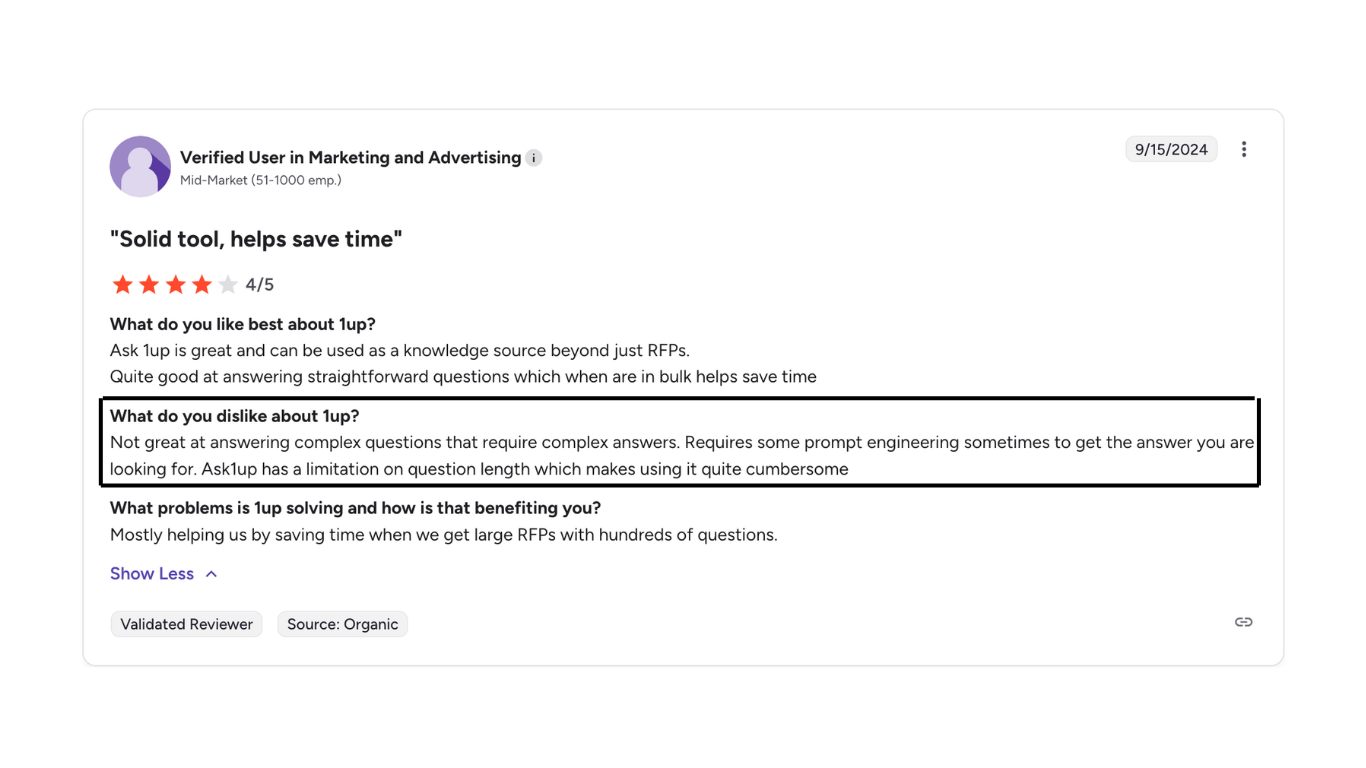
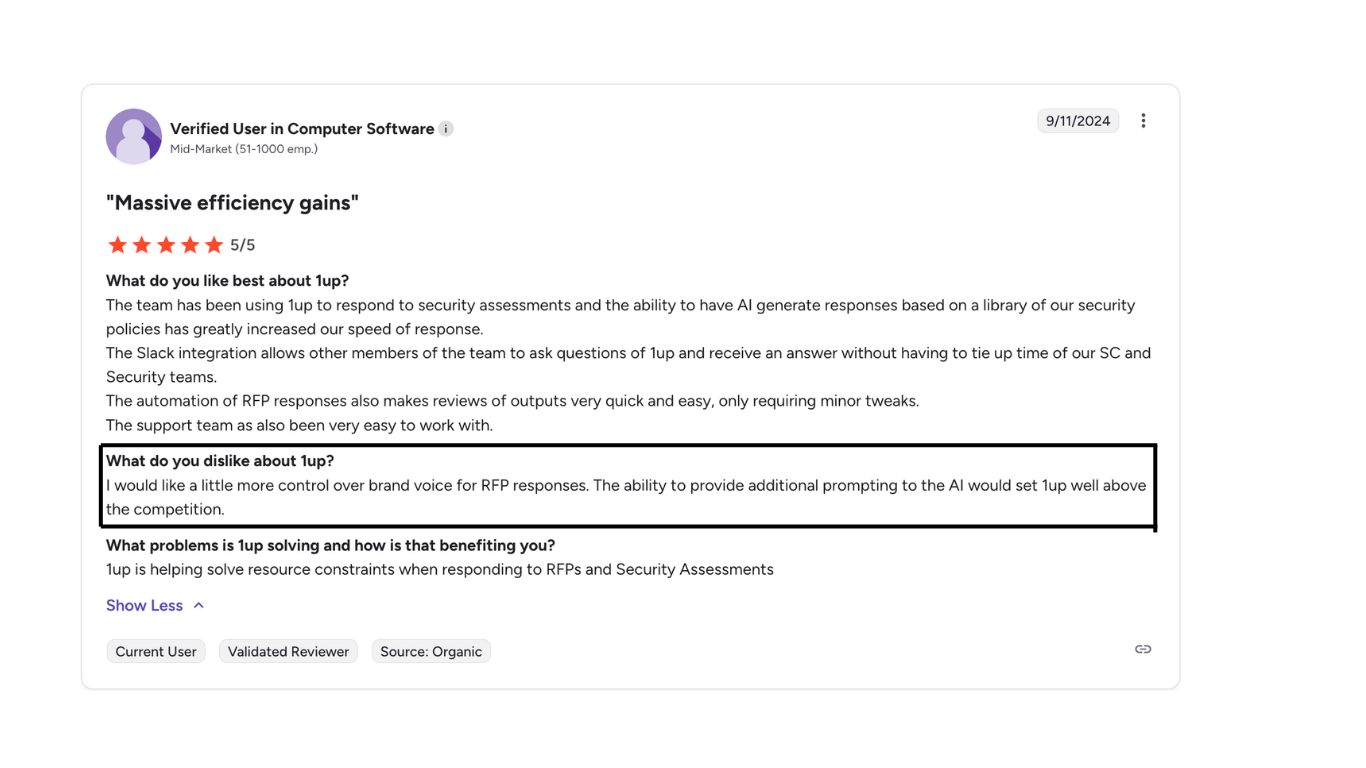
1Up reviews across G2 praise it for its implementation speed, but at the same time also mention inconsistency in the quality of AI-generated output
A verified user who works in marketing and advertising at a mid-market organization discusses 1Up’s inability to address complex questions and the disadvantage of a question-length limit. This made the whole process quite cumbersome for them.
Another user who works in Computer Science for a mid-market organization faced issues with the inconsistency in maintaining the brand voice in the output.
Key features of 1Up
1Up is built for knowledge automation and RFP response across sales and presales workflows. Core capabilities include:
- AI answer generation: Connects to your existing sources, company website, Google Drive, Confluence, Notion, SharePoint, previous RFPs, and generates new responses to incoming questions rather than retrieving pre-written answers.
- Questionnaire automation: Handles Word, Excel, PDF, Google Sheets, and web-based questionnaires. The browser extension enables auto-fill directly on procurement portals without export.
- Ask 1Up (conversational Q&A): Sales reps ask free-form questions in Slack, Microsoft Teams, or Google Chat and receive instant, sourced answers from the knowledge base.
- Self-learning AI: Learns from user feedback, upvotes, downvotes, and manual corrections to refine accuracy over time. The more it's used, the more it's calibrated to your specific language and product positioning.
- Collaboration and review workflows: Assign teammates to review, edit, and approve responses. Multiple reviewers can contribute to a single questionnaire with full activity visibility for admins.
- Multi-language support: Automatically translates responses into the team's preferred language without requiring pre-translated source documents.
- Trust hub: Customer-facing portal for compliance and security documentation, reducing the volume of one-off questionnaires by making security information self-serve.
What 1Up does not do: it doesn't manage complex multi-stage RFP project workflows with milestone tracking and document submission coordination, it doesn't generate pre-call briefs or post-call follow-ups from CRM and call recording data, and it doesn't pull live deal-specific signals to tailor responses to a particular buyer's context.
When 1Up works well: Sales and presales teams with regular RFP and questionnaire volume, well-documented product and technical knowledge across accessible sources, and a need for fast, low-maintenance answer automation without a months-long library setup.
When it breaks down: Organizations with complex multi-team approval chains, strict requirements for pre-approved verbatim responses, or high-volume concurrent RFP project management needs often find 1Up's project layer insufficient for their operational complexity.
What is the implementation and setup process for 1Up?
1Up is genuinely fast to set up. The platform is designed to run in minutes, not weeks. This is one of its most consistently validated claims across user reviews and product documentation, and it reflects a fundamental architectural choice. 1Up generates answers from your existing sources rather than requiring you to build a library from scratch first.
The setup process runs through three steps:
- Connect your knowledge sources, link your company website URLs, Google Drive, Confluence, Notion, SharePoint, and any other documentation repositories. 1Up automatically crawls and indexes the connected content. This step takes minutes for most teams with organized documentation.
- Upload your first questionnaire, import a Word, Excel, PDF, or Google Sheets document, or activate the browser extension for a web-based portal. 1Up analyzes the document, matches each question to the most relevant source content, and generates a full draft response set.
- Review, refine, and configure collaboration by inviting teammates, assigning sections for review, setting role-based access controls, and configuring SSO as needed. Teams that want Slack or Teams integration add the bot connection at this stage.
The quality of the knowledge base compounds over time. As the team uses 1Up to upvote accurate responses, correct misses, and upload new documentation, the AI calibrates to the team's specific language and positioning. Most teams report noticeable improvements in accuracy within the first two to three weeks of active use.
For enterprise deployments with larger source libraries, SSO configuration via Okta, Azure, FusionAuth, or Ping Identity, and CRM integration, the process takes longer, but reviewers consistently describe even complex setups as measured in days rather than weeks. The absence of a library migration project is the key difference from platforms like Loopio or Responsive, where content migration alone can take months.
The meaningful caveat: 1Up's setup speed assumes your existing documentation is organized and accessible. Teams with fragmented, inconsistent, or outdated internal knowledge will find that 1Up quickly surfaces their documentation gaps. While this is useful information, it also means early response quality reflects the state of the knowledge base rather than a limitation of the platform.
SiftHub vs. 1Up
1Up helps sales teams answer RFPs and questionnaires faster by automating responses from connected knowledge sources.
SiftHub is built for a different scope entirely, not just answering questions, but executing the full deal content lifecycle.
Where 1Up fills in forms, SiftHub generates complete proposals, solution briefs, and compliance-ready collateral, and orchestrates the workflow that gets them out the door correctly.
1. Live deal context vs. connected documentation
1Up generates answers from your knowledge sources, website, Drive, Confluence, and previous RFPs. SiftHub connects to your live GTM stack, Gong, Salesforce, Google Drive, Slack, and pulls context from actual deal history when drafting responses. Every closed opportunity enriches the knowledge base, improving accuracy, tone, and relevance over time. 1Up doesn't have that learning loop.
- Answers reflect the buyer's industry, use case, and deal stage.
- Context comes from what was discussed with this prospect, not just what's in your docs.
- Auto-fill rates of 70–90% from connected, always-current knowledge, with greater than 99.2% answer accuracy.
What you get: RFP responses that sound like your best rep wrote them for this deal, not like your documentation answered a generic question.
2. Full deal orchestration vs. questionnaire automation
1Up starts and ends at the questionnaire. SiftHub manages the entire deal cycle, from pre-call prep to RFP response to post-deal handover, automatically triggered by deal signals.
And where 1Up's collaboration layer is lightweight, SiftHub provides structured workflows: task assignments, approvals, versioning, and project management, so every RFP and proposal is tracked from start to finish.
What you get: One platform where sales, SEs, and bid teams execute together on complex deals, not just a faster way for individuals to answer questions.
3. AI that understands the RFP, not just answers it
1Up generates responses by matching questions to your connected knowledge sources. SiftHub reads the full intake document, including appendices, buried requirements, and deadline references scattered throughout the document, and generates a structured checklist of milestones, mandatory submissions, and recommended attachments before drafting begins.
Customers report saving 14+ hours per project and achieving up to 8x faster turnaround on RFP and security questionnaire responses.
- AI Suggestions decode the full scope of the RFP automatically
- Smart document recommendations pull the right attachments from your knowledge base
- One-click task creation with owners and due dates from the intake docs
- Executive summary with deal context, competitors, key risks, and instructions, ready for alignment or handoff
What you get: Less time hunting for requirements. More time submitting a response that's actually complete.
Key features of SiftHub
RFPs: Reads intake documents, generates structured checklists, and auto-fills 80–90% of responses from your live, connected knowledge. Source attribution on every answer. Works natively in Google Sheets/Docs and Microsoft Excel/Word, no import/export loops. Unlike 1Up, SiftHub includes native add-ins for Microsoft Excel and Word and operates directly within vendor portals.
Project tasks: Purpose-built RFP workflow management: document submissions, milestone tracking, and submission coordination in one place. Assign owners, set due dates, leave comments, and move files to your submission checklist with one click.
Deal brief builder: Auto-generated briefs for every opportunity, pulling from calls, emails, Salesforce, and enablement content. Role-specific views for AEs, SEs, CS, and leadership. Pre-call prep and handover docs are created automatically when deal signals trigger them.
Sales collateral builder: Tailored solution stories, battlecards, proposals, and POV decks generated from live CRM and call data, not generic templates.
Enterprise-grade security: SOC 2 Type II, ISO 27001, and VAPT certified. Granular RBAC, SSO, full audit trails, and region-aware data residency for healthcare, BFSI, and regulated industries.
1Up is a capable tool for sales and presales teams that need fast, low-friction questionnaire automation without a library setup project. If you want faster Q&A, 1Up can work. If you want sales, SEs, and bid teams all executing together on complex deals, with full proposals, structured workflows, and a system that gets smarter with every win and loss, SiftHub is the better fit.