About the integration

Ever been stuck searching for that one answer you know exists somewhere?

You’ve scoured through threads, DMed your colleagues, and still—no luck. Sound familiar?

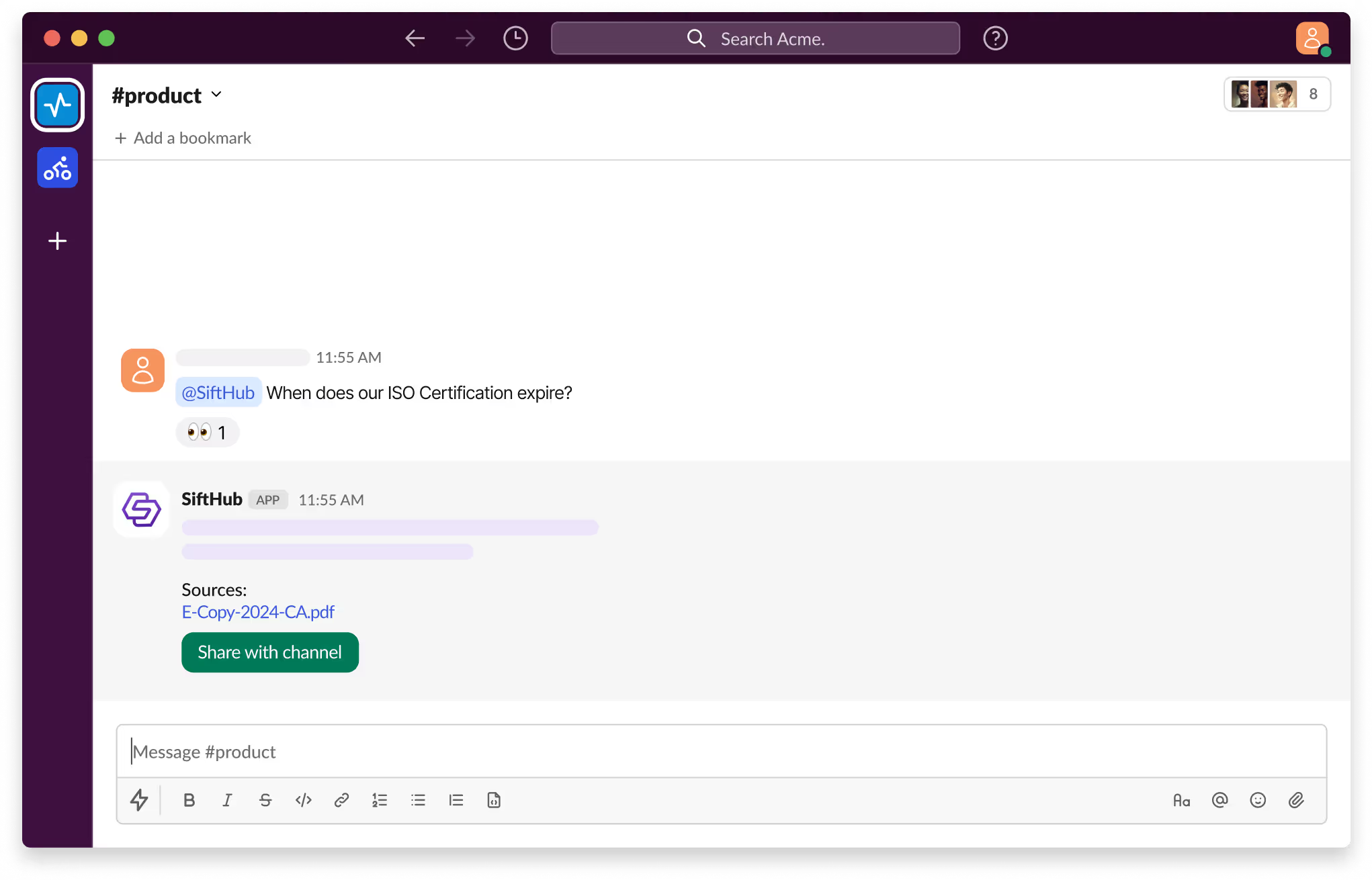
With SiftHub bot for Slack, those days are over. Simply @SiftHub in any Slack channel (public or private) and ask your question. Instantly, you'll get a response powered by the collective knowledge of all your connected sources on the SiftHub Platform.

No more digging, no more guessing—just answers, right when you need them.

SiftHub uses an API-based connection to index Gong transcripts for search and response generation. This setup allows sales engineering teams to access verbal discovery data directly within their RFP and proposal workflows, ensuring technical responses are grounded in actual customer requirements.

Capabilities

Activating the SiftHub bot for Slack

Step 1:

Sign into your company’s SiftHub account here.

Step 2:

Once you’ve logged in, navigate to the ‘Connectors’ tab in the left side panel and select ‘Bots’. Find the ‘Slack’ bot in the ‘Bots’ tab and click ‘Activate’ after reading the description given there.

Step 3:

On the OAuth consent screen that opens, make sure the correct Slack Workspace is selected and click on the Allow button to approve the request for SiftHub to access your Slack workplace. It's important to review the permission that the consent screen shows before assenting to the permission request.

Step 4:

Once the setup is successful, you will be redirected to the SiftHub Web App and your bot connection status will show ‘Activated’.

Your SiftHub bot for Slack is now set up, make sure you test it!

Go to your Slack workspace to confirm that the SiftHub app now shows on the app section of your workspace. Tag @SiftHub in a channel or ask the bot a question via DM and confirm that you get a response. 

SiftHub-Slackbot-Product

Disclaimer:
SiftHub uses AI language models that generate responses from your organization’s connected knowledge sources. But it may sporadically be inaccurate. Always verify critical information independently when making important decisions.

Connection type SiftHub connects to Gong using a secure, API based integration. A Gong Administrator generates the Access Key, Secret Key, and Base URL in Gong's Company Settings. These credentials are shared with your SiftHub CSM, who completes the backend configuration.

Setup takes less than 10 minutes.
What gets indexed SiftHub indexes Gong call transcripts, including technical requirements, competitor mentions, and customer objections identified during discovery.

Admins control scope. You can sync specific workspaces, library folders, or selected user groups.
How it works for RFPs SiftHub scans transcripts for customer requirements in an RFP, security questionnaire, or SOW, and maps them to pre approved answers in your content library.

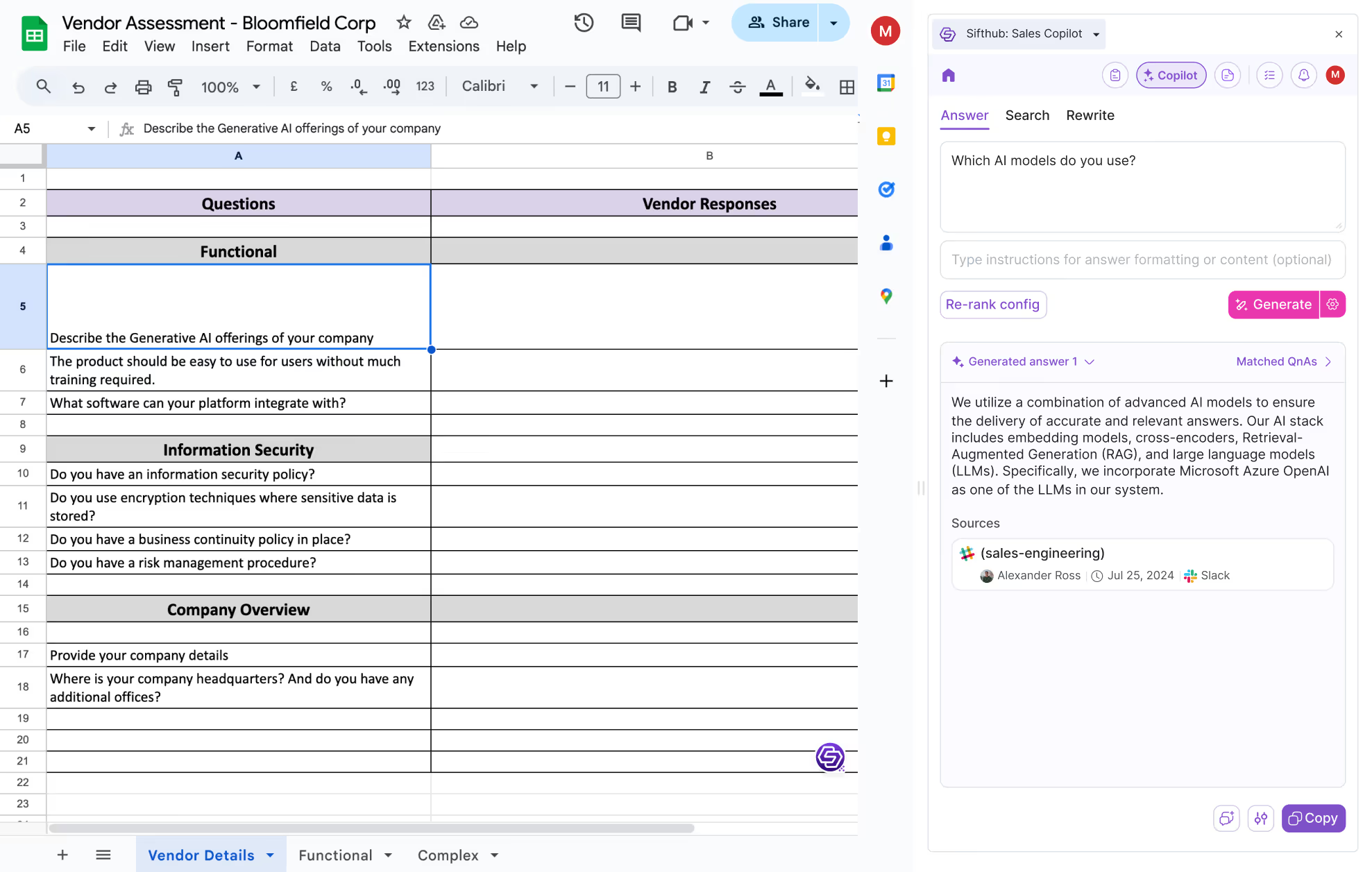
This gives the AI the context it needs to draft accurate, sourced responses to your open documents. Responses are injected directly into Google Docs, Word, or Excel templates while preserving formatting.

Every response links back to the exact Gong timestamp it came from.
How it helps in prep, follow up, and handoff SiftHub surfaces everything discussed in Gong, combined with context from your CRM, Slack, email, and other connected tools, so sales teams walk into calls fully prepared.

No repeated discovery questions. No manual summaries. After the call, SiftHub uses that same deal context to auto generate follow up collateral and handover docs, so nothing gets lost between teams.
Knowledge base updates SiftHub identifies questions from Gong calls that have no high confidence match in your library. For each gap, the AI drafts a suggested Q&A pair based on the Sales Engineer’s explanation.

That draft is routed to a Subject Matter Expert for one click approval before it is added to the repository. Every new library entry links back to the source Gong recording.
Competitive intelligence SiftHub monitors synced Gong calls for competitor names and objection triggers in real time.

When a competitor is detected, SiftHub pushes a summary and a link to the relevant battlecard via Slack, Microsoft Teams, or the SiftHub browser extension before the conversation moves on.
Access controls SiftHub mirrors Gong's native access permissions. Users can only see call transcripts they are authorized to view in Gong.

Admins can choose between Open Access (team wide) and Restricted Access (attendees only). Gong data is encrypted in transit and at rest.

SiftHub is SOC 2 Type II compliant and supports GDPR scoped ingestion at the regional or team level.

Is SiftHub’s Gong integration secure?

SiftHub protects Gong data through secure, API-based ingestion, SOC 2 Type II compliance, and source-level permission mirroring. The integration is built to respect the existing governance and privacy controls you have established within your Gong environment.

  • Permissions are respected: SiftHub reflects Gong's native access controls. If a user is restricted from a workspace or folder in Gong, they won't see that data in SiftHub either.
  • PII is protected: SiftHub's indexing workflows are designed to exclude or redact Personally Identifiable Information, so sensitive details don't surface in AI-generated responses.
  • You stay in control: Admins can limit data syncs to specific regions, teams, or folders to comply with GDPR or other regional data-residency requirements.
  • Your data is encrypted: All Gong data is encrypted in transit and at rest using industry-standard protocols.
  • Enterprise-grade compliance: SiftHub is SOC 2 Type II-certified and supports GDPR-compliant ingestion at the team or regional level.

How to set up

Activating the SiftHub bot for Slack

Step 1:

Sign into your company’s SiftHub account here.

Step 2:

Once you’ve logged in, navigate to the ‘Connectors’ tab in the left side panel and select ‘Bots’. Find the ‘Slack’ bot in the ‘Bots’ tab and click ‘Activate’ after reading the description given there.

Step 3:

On the OAuth consent screen that opens, make sure the correct Slack Workspace is selected and click on the Allow button to approve the request for SiftHub to access your Slack workplace. It's important to review the permission that the consent screen shows before assenting to the permission request.

Step 4:

Once the setup is successful, you will be redirected to the SiftHub Web App and your bot connection status will show ‘Activated’.

Your SiftHub bot for Slack is now set up, make sure you test it!

Go to your Slack workspace to confirm that the SiftHub app now shows on the app section of your workspace. Tag @SiftHub in a channel or ask the bot a question via DM and confirm that you get a response. 

SiftHub-Slackbot-Product

Disclaimer:
SiftHub uses AI language models that generate responses from your organization’s connected knowledge sources. But it may sporadically be inaccurate. Always verify critical information independently when making important decisions.

The SiftHub Gong integration is configured via a secure API connection between your Gong instance and the SiftHub platform. Setting up the connector requires a Gong Administrator to generate the required API credentials and typically takes less than 10 minutes.

1. Prerequisites

Before beginning the setup, ensure you have the following:

  • Gong Administrator access: Required to generate API keys within your Gong organization.
  • SiftHub implementation contact: You will need to share the generated keys securely with your SiftHub CSM or technical owner.

2. Configuration Steps

Step 1: Generate Gong API keys

  1. Sign in to Gong with your administrator account.
  2. Navigate to the Home page and click Company Settings in the left-hand panel.
  3. Under the Ecosystem section, select API.
  4. Open the API KEYS tab.
  5. Copy and save the Base URL displayed on the screen.
  6. Click Get API Key to generate your Access Key and Secret Key. Use the "Show secret" option to reveal the Secret Key.

Step 2: Securely share credentials 

Provide the following three values to your SiftHub CSM or implementation owner:

  • Base URL
  • Access Key
  • Secret Key

Step 3: Define scope and sync 

Once the keys are provided, the SiftHub team will configure the backend integration. During this step, you will define the ingestion scope by identifying which specific workspaces, folders, or user groups SiftHub should index.

3. Activation and timing

  • Initial Sync: Once the keys are entered and the scope is defined, the initial data sync usually completes within a few hours.
  • Verification: You can verify the connection by searching for a recent Gong call transcript within the SiftHub core app or browser extension.

Frequently asked questions

Do I need to be a Gong admin to connect SiftHub?
Yes. A Gong administrator must generate the API credentials (Base URL, Access Key, and Secret Key) within Gong’s Company Settings. These keys allow SiftHub to securely access and index your call transcripts. Once these details are shared with your SiftHub CSM, the technical activation is handled on the backend.
How long does it take to set up the Gong integration?
The initial setup takes approximately 10 minutes to generate keys, and the integration is typically live within 24 hours. Once you provide the API credentials and specify your ingestion scope to your SiftHub CSM, the system begins indexing your transcripts. Initial data syncs usually finalize a few hours after activation.
Can I control which Gong calls are synced to SiftHub?
Yes. SiftHub offers granular ingestion controls, allowing you to sync entire workspaces, specific library folders, or only calls from selected users. You can also start with a narrow pilot, such as a single folder of "Technical Demos", and expand the scope to your full organization as your use case grows.
Does SiftHub respect Gong’s native privacy and access permissions?
Yes. SiftHub is built to mirror source-level permissions, ensuring users only see insights from calls they are authorized to access in Gong. You can also choose between an "Open Access" model for team-wide collaboration and a "Restricted Access" model in which users see transcripts only for meetings they personally attended.
What specific value do Sales Engineers (SEs) get from this integration?
Sales Engineers use the Gong integration to eliminate manual call summaries and avoid repeating discovery questions in technical deep dives. By surfacing what was previously answered in Gong, SEs can walk into meetings with full context, using the AI to auto-generate follow-up collateral and handover documentation directly from the call audio.
Can SiftHub use Zoom transcripts if we don’t use Gong for every team?
Yes. SiftHub integrates with multiple call recording platforms, including Zoom, Clari, and Gong. This multi-source capability is ideal for global organizations where certain regions may use different tools due to GDPR constraints or local preferences, ensuring a unified intelligence layer across the entire GTM stack.
How quickly are new Gong transcripts available in SiftHub?
New transcripts appear in SiftHub within 24 hours of a meeting ending, which aligns with Gong's own SLA for transcript processing via the API.
Can SiftHub update our knowledge base automatically from Gong calls?
Not automatically, but close. SiftHub identifies questions from Gong calls that have no match in your content library, drafts a suggested Q&A based on what was said, and routes it to a Subject Matter Expert for one-click approval before anything gets added. You stay in control of what goes into the library.
How does SiftHub handle competitive intelligence from Gong calls?
SiftHub monitors synced calls for competitor mentions in real time. When a competitor is detected, SiftHub surfaces a summary and links to the relevant battlecard, pushed via Slack, Microsoft Teams, or the SiftHub browser extension, before the conversation moves on.
Can SiftHub use Gong content alongside other connected tools?
Yes. Gong is one source in a broader intelligence layer. SiftHub combines it with your CRM, Slack, email, and other connectors so that responses, prep briefs, and handover docs always reflect the full picture of a deal, not just what came up on one call.

Need additional support?

If you need any additional help in setting up your integration, feel free to reach out directly to your SiftHub Customer Success Manager, or write to us at support@sifthub.io.

AI RFP software that works where you work

#setup{ scroll-padding-top: 140px; }