SiftHub Logo-sm

SiftHub + Highspot

Turn your Highspot library into an active participant in every deal, not just a place where content lives.

Start Integrating Today

About the integration

Ever been stuck searching for that one answer you know exists somewhere?

You’ve scoured through threads, DMed your colleagues, and still—no luck. Sound familiar?

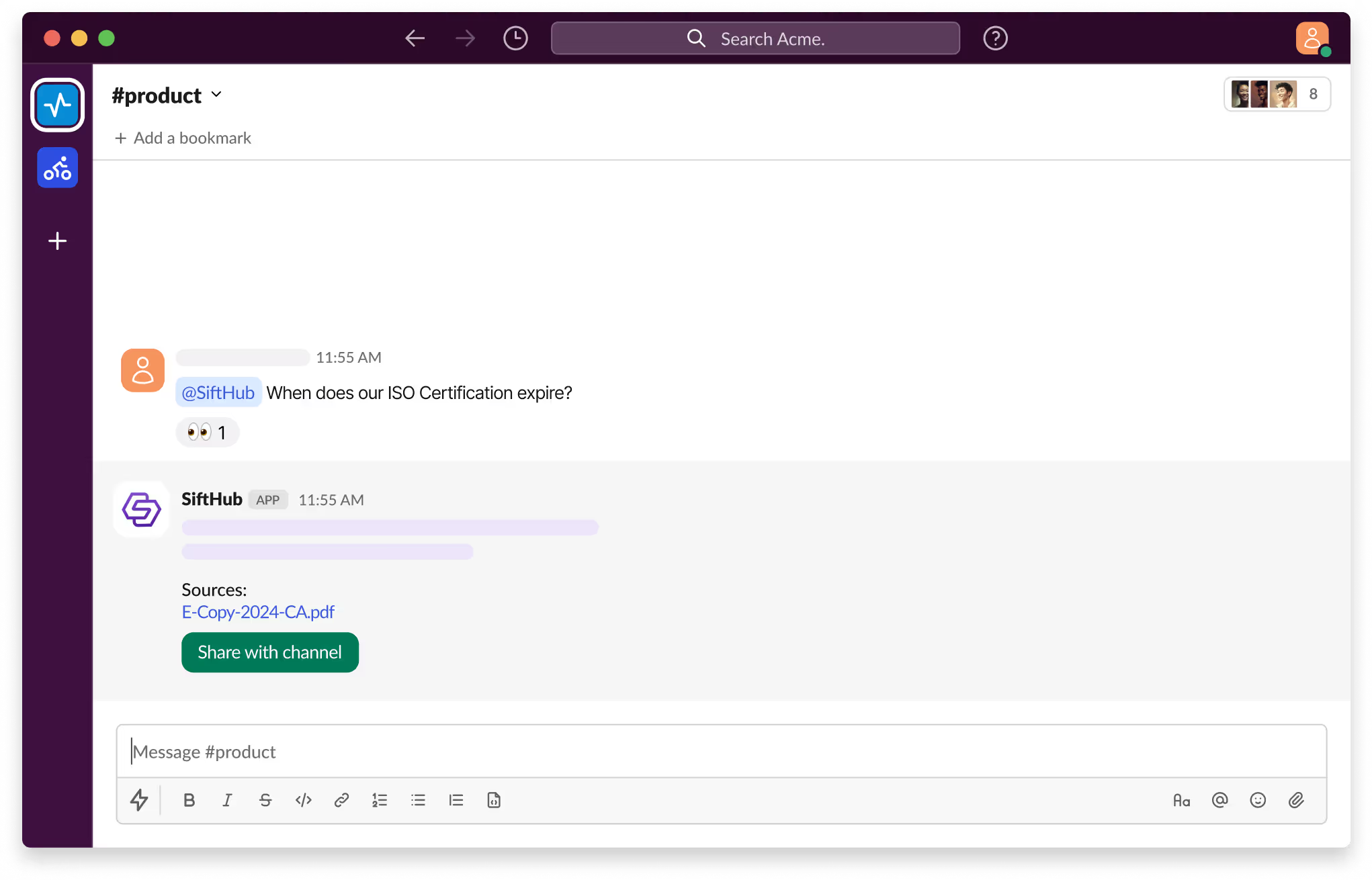
With SiftHub bot for Slack, those days are over. Simply @SiftHub in any Slack channel (public or private) and ask your question. Instantly, you'll get a response powered by the collective knowledge of all your connected sources on the SiftHub Platform.

No more digging, no more guessing—just answers, right when you need them.

SiftHub connects to Highspot through a dedicated API user you set up in your Highspot account. You generate the credentials and share them with your SiftHub CSM. They activate the connection within 24 hours. You choose which Spots get indexed. SiftHub never touches content outside what you include.

Capabilities

Activating the SiftHub bot for Slack

Step 1:

Sign into your company’s SiftHub account here.

Step 2:

Once you’ve logged in, navigate to the ‘Connectors’ tab in the left side panel and select ‘Bots’. Find the ‘Slack’ bot in the ‘Bots’ tab and click ‘Activate’ after reading the description given there.

Step 3:

On the OAuth consent screen that opens, make sure the correct Slack Workspace is selected and click on the Allow button to approve the request for SiftHub to access your Slack workplace. It's important to review the permission that the consent screen shows before assenting to the permission request.

Step 4:

Once the setup is successful, you will be redirected to the SiftHub Web App and your bot connection status will show ‘Activated’.

Your SiftHub bot for Slack is now set up, make sure you test it!

Go to your Slack workspace to confirm that the SiftHub app now shows on the app section of your workspace. Tag @SiftHub in a channel or ask the bot a question via DM and confirm that you get a response. 

SiftHub-Slackbot-Product

Disclaimer:
SiftHub uses AI language models that generate responses from your organization’s connected knowledge sources. But it may sporadically be inaccurate. Always verify critical information independently when making important decisions.

Connection type SiftHub connects to Highspot via a dedicated API user created in your Highspot account. You generate an API Key and Secret, then share them with your SiftHub CSM. They complete activation within 24 hours. Setup takes about 5 minutes. Requires a Highspot Platform+ subscription.
What gets indexed SiftHub indexes content from your selected Highspot Spots — presentations, documents, spreadsheets, PDFs, CSVs, and text files. You can connect an entire Spot or multiple Spots across your Highspot environment.
How it works Highspot is where your best sales content lives: battlecards, playbooks, win stories, and competitive decks. SiftHub makes it all searchable throughout your deal cycle. The right asset surfaces at the right moment, whether your team is filling out an RFP, prepping for a call, or handing off to Customer Success. Every answer links back to the exact Highspot content it came from.
Content updates SiftHub syncs new and modified Highspot content within 30 minutes. This covers new items, content edits, permission changes, and deletions. Deleted or archived items are automatically removed from SiftHub results.
Access controls SiftHub mirrors Highspot's native permissions. Users only see content they have access to in Highspot. Access updates automatically when permissions change.

Is SiftHub's Highspot integration secure?

SiftHub accesses Highspot through a dedicated API user, not a personal account. Access is controlled, auditable, and easy to revoke. Here's how the rest of the security model works.

  • Dedicated API access: SiftHub uses a service account marked by Highspot Support. It's exempt from password expiration and excluded from your license count.
  • Scoped by design: SiftHub indexes only the Spots you connect. Everything else in your Highspot environment stays untouched.
  • Permissions are respected: SiftHub reflects Highspot's existing access controls. If a user can't view content in Highspot, they won't find it in SiftHub. Permission changes are picked up automatically.
  • Data is encrypted: All Highspot data is encrypted in transit and at rest.
  • Enterprise-grade compliance: SiftHub is SOC 2 Type II certified across all connector types.

How to set up

Activating the SiftHub bot for Slack

Step 1:

Sign into your company’s SiftHub account here.

Step 2:

Once you’ve logged in, navigate to the ‘Connectors’ tab in the left side panel and select ‘Bots’. Find the ‘Slack’ bot in the ‘Bots’ tab and click ‘Activate’ after reading the description given there.

Step 3:

On the OAuth consent screen that opens, make sure the correct Slack Workspace is selected and click on the Allow button to approve the request for SiftHub to access your Slack workplace. It's important to review the permission that the consent screen shows before assenting to the permission request.

Step 4:

Once the setup is successful, you will be redirected to the SiftHub Web App and your bot connection status will show ‘Activated’.

Your SiftHub bot for Slack is now set up, make sure you test it!

Go to your Slack workspace to confirm that the SiftHub app now shows on the app section of your workspace. Tag @SiftHub in a channel or ask the bot a question via DM and confirm that you get a response. 

SiftHub-Slackbot-Product

Disclaimer:
SiftHub uses AI language models that generate responses from your organization’s connected knowledge sources. But it may sporadically be inaccurate. Always verify critical information independently when making important decisions.

Setup takes about 5 minutes. You'll create a dedicated API user in Highspot and generate credentials for it. Your SiftHub CSM handles activation within 24 hours.

Connection requirements

Before you begin, make sure you have the following, or contact the relevant administrator:

  • Highspot Administrator access: Required to add users for API access
  • Highspot Platform+ subscription: Required to enable API integrations
  • SiftHub Admin or Account Owner role: Required to activate the connector from the SiftHub Web App → Connectors → Apps

Step 1: Add a developer user for API access

In Highspot, go to Company Settings → Access & Privacy → API Access. Add a dedicated developer user, ideally a service account email. Click Save.

Step 2: Generate an API Key and Secret

Log in as the new developer user. Go to Settings → Developer → Basics and click Generate API Key & Secret. Copy both values and share them with your SiftHub CSM.

Step 3: Request Service Account marking

Contact Highspot Support and ask them to mark the developer user as a Service Account. This prevents password expiration from disrupting the integration and keeps the account out of your license count.

Step 4: Share your Spot details with your SiftHub CSM

Tell your SiftHub CSM which Spots you want indexed. Share the relevant Spot URLs. They'll configure the rest.

Activation and timing

Your setup time ~5 minutes
CSM activation Within 24 hours of receiving credentials
Sync frequency Every 30 minutes

Frequently asked questions

Do I need a Highspot Admin to connect SiftHub?
Yes. A Highspot Administrator adds the developer user for API access. After that, the developer user generates the API Key and Secret independently.
Do I need a specific Highspot subscription?
Yes. API integrations require a Highspot Platform+ subscription. Check with your Highspot Account Manager if you're unsure about your plan.
How long does setup take?
About 5 minutes on your end. Once your SiftHub CSM receives the credentials, activation is complete within 24 hours.
Can I control which Highspot content gets indexed?
Yes. SiftHub indexes only the Spots you connect. You can start with one Spot and expand at any time by sharing additional Spot URLs with your CSM.
Does SiftHub respect Highspot's native permissions?
Yes. Users only see content they're already authorized to view in Highspot. Permission changes are picked up automatically.
What happens if content is deleted in Highspot?
Deleted or archived items are removed from SiftHub results within the next sync cycle.
Why does the API user need to be marked as a Service Account?
Highspot's default password expiration can disrupt the integration if the developer user's password expires. A Service Account is exempt from this. It also stays out of your license count.
Our battlecards get updated often. Will SiftHub always have the latest version?
Yes. SiftHub syncs every 30 minutes. Updated content will be available in SiftHub in the next cycle.
Can reps access Highspot content from SiftHub during a deal?
Yes. Connected Highspot content appears in search results, AI-generated answers, and document autofill, right inside the SiftHub Web App and browser extension.
Can SiftHub use Highspot content alongside other connected tools?
Yes. Highspot is one source in a broader intelligence layer. SiftHub combines it with your CRM, Slack, Gong, Google Drive, and other connectors. Every response draws from your full knowledge base, not just your sales enablement library.

Need additional support?

If you need any additional help in setting up your integration, feel free to reach out directly to your SiftHub Customer Success Manager, or write to us at support@sifthub.io.

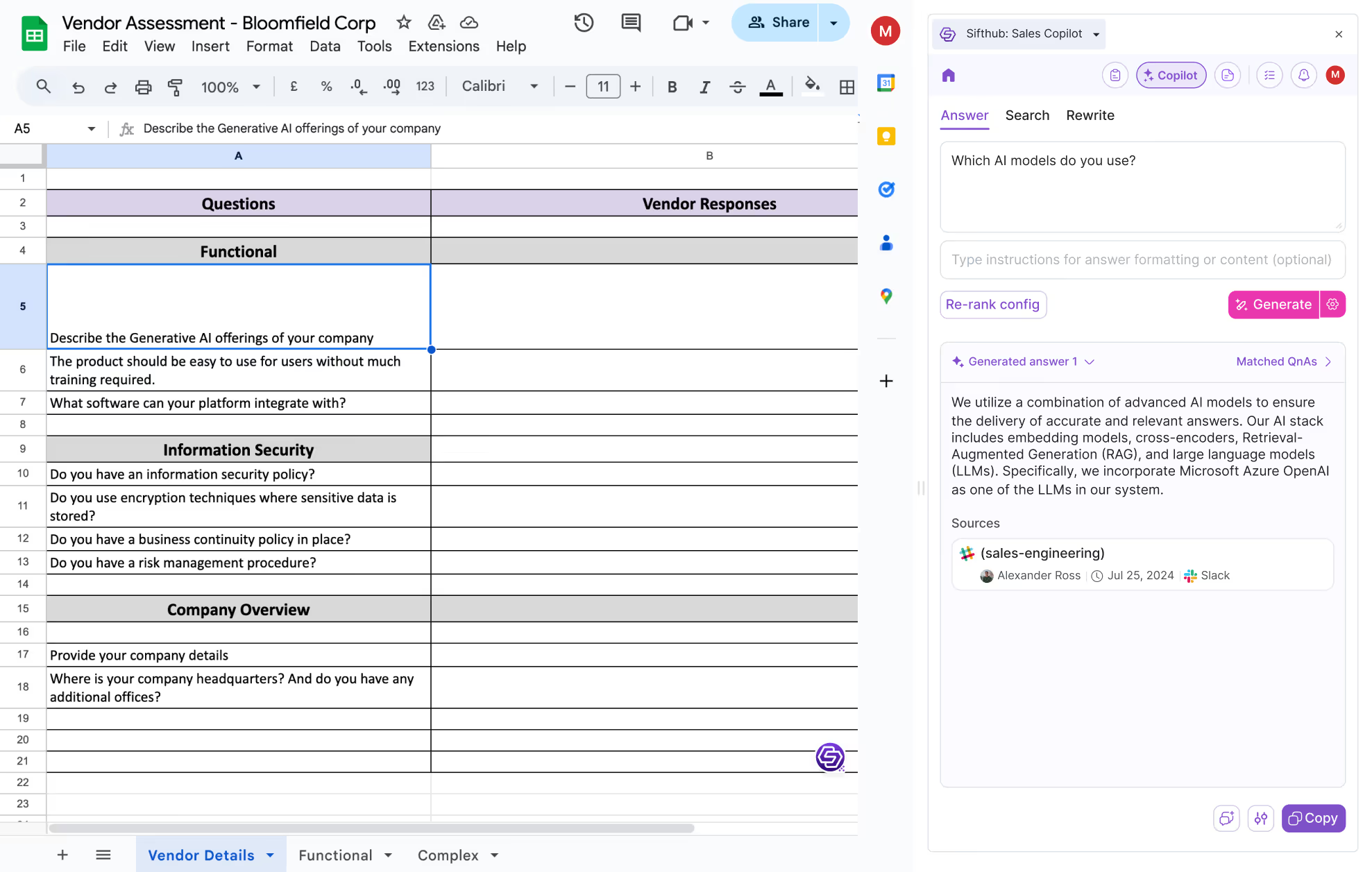
AI RFP software that works where you work

#setup{ scroll-padding-top: 140px; }