



SiftHub is the best RFP response tool for B2B sales and presales teams evaluating Responsive in 2026. It generates responses from live connected knowledge across your CRM, calls, and emails, so answers reflect the actual deal, not a library someone has to maintain.
- Responsive pricing is not published. Annual costs range from $7,000 to $28,000, with the average buyer paying around $13,955 per year. The final number only appears after a sales conversation.
- Onboarding, data migration, premium support, and dedicated cloud hosting are paid add-ons in Responsive. The base license is the starting point, not the finish line.
- Responsive AI performance depends entirely on library quality. Without a dedicated content owner actively updating and tagging answers, the tool becomes an expensive search bar.
- Implementation takes 4 to 8 weeks for mid-market teams and several months for large enterprises. AI fill rates only reach a useful threshold after months of active use.
- Responsive works well for enterprises with a dedicated bid team, high concurrent RFP volume, and the operational runway to invest in library governance. It breaks down for teams that need responses grounded in a live buyer context.
SiftHub is the best RFP response tool for B2B sales and presales teams evaluating Responsive in 2026. It generates responses from live connected knowledge across your CRM, calls, and emails, so answers reflect the actual deal, not a library someone has to maintain.
- Responsive pricing is not published. Annual costs range from $7,000 to $28,000, with the average buyer paying around $13,955 per year. The final number only appears after a sales conversation.
- Onboarding, data migration, premium support, and dedicated cloud hosting are paid add-ons in Responsive. The base license is the starting point, not the finish line.
- Responsive AI performance depends entirely on library quality. Without a dedicated content owner actively updating and tagging answers, the tool becomes an expensive search bar.
- Implementation takes 4 to 8 weeks for mid-market teams and several months for large enterprises. AI fill rates only reach a useful threshold after months of active use.
- Responsive works well for enterprises with a dedicated bid team, high concurrent RFP volume, and the operational runway to invest in library governance. It breaks down for teams that need responses grounded in a live buyer context.
Responsive (formerly RFPIO) is an enterprise RFP and response management platform. Pricing is custom and unpublished, with annual costs ranging from roughly $7,000 to $28,000 depending on team size, tier, and add-ons.
This guide breaks down what Responsive actually costs, what users say after using it, and what to expect during implementation.
What pricing does Responsive offer?
Responsive does not publish pricing. The vendor operates on a fully sales-led, custom-quote model: no rate card, no self-serve trial, no public tier breakdown with dollar amounts. What you see on the pricing page are four named editions, with no numbers.
The four-edition model
Responsive offers four plans: Lite, Emerging, Growth, and Enterprise. Each is scoped by team size, feature access, and workflow complexity.
- Lite: Core AI agents, proposal builder, SSO, and admin reporting. Designed for teams of up to 50 employees still formalizing their RFP process.
- Emerging: Adds guided projects, content translation, and advanced user provisioning. Built for scaling teams that handle global response workflows.
- Growth: Designed for teams up to 500 users. Includes API access, advanced roles, cloud hosting options, and premium support.
- Enterprise: Flexible licensing, dedicated cloud and GovCloud options, business units, sandboxing, and domain validation for large structured deployments.
Third-party procurement data indicate an annual cost range of $7,092 to $27,935, with the average buyer paying approximately $13,955 per year.
Mid-market teams with complex integrations and heavier governance requirements land toward the higher end of that range.
The hidden cost layers
Responsive's base license is just the starting point. Several capabilities that enterprise teams treat as standard require separate conversations and, frequently, separate line items.
- GovCloud and Dedicated cloud hosting are not included in lower-tier plans by default. Teams in regulated industries or government contracting that need these environments pay additional fees on top of the base subscription.
- Premium onboarding and data migration are not bundled. Standard data migration support is a paid add-on. For organizations with large legacy libraries, tens of thousands of Q&A pairs across years of submissions, this can be a meaningful first-year cost.
- Premium support packages are tiered separately. Teams that need higher-priority response times or named support contacts pay beyond the base plan.
- AI usage at scale often incurs costs. Responsive positions its AI agent suite as core to the platform, but deeper AI capabilities, content scoring, and specialized agents beyond basic drafting are more accessible at higher tiers. Buyers should confirm exactly which AI features are active at their contract level before assuming the full suite is included.
What are user reviews for responsive?
Positive feedback
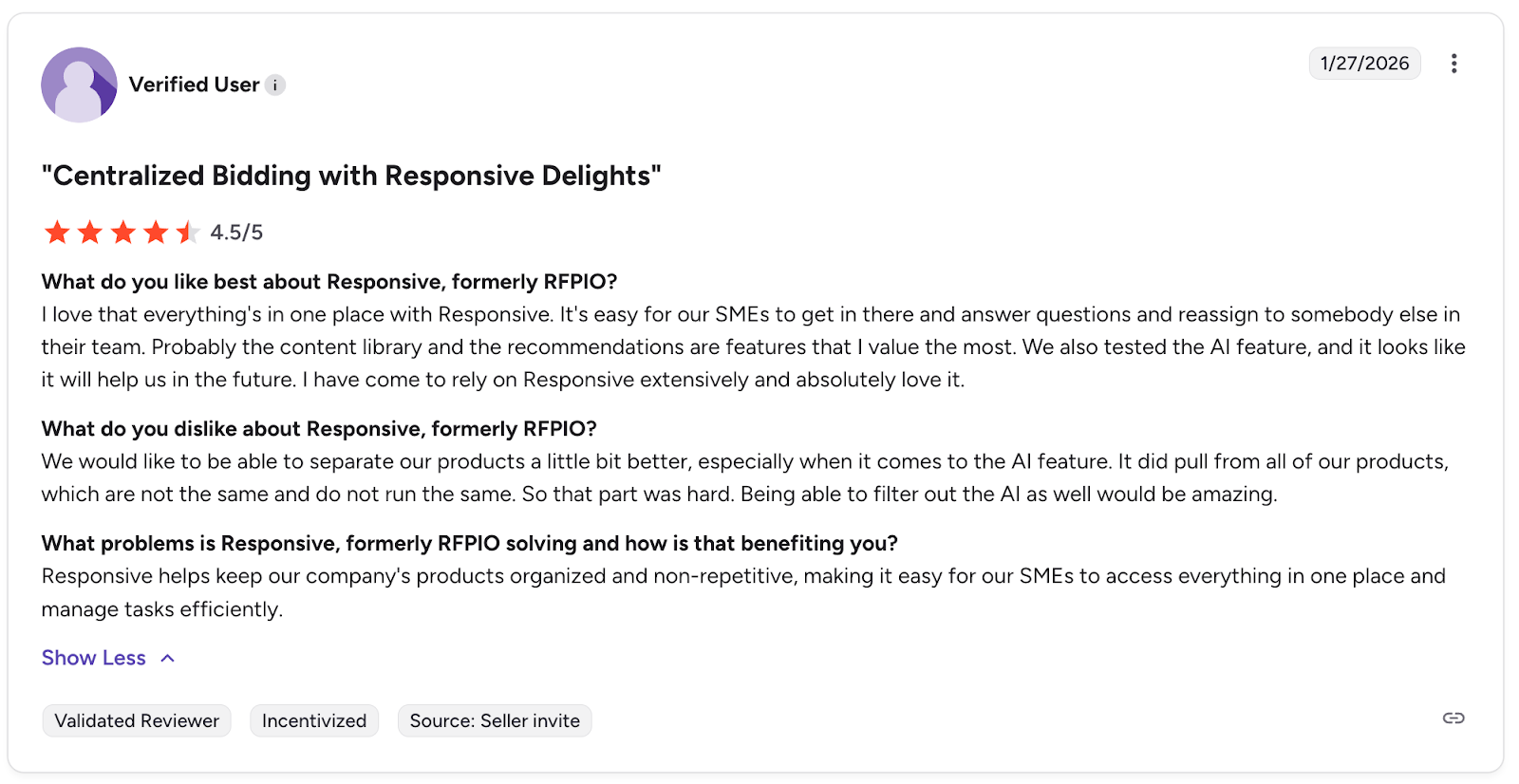
Users are happy with the centralized AI and the ease of access it gives SMEs for answering questions.
Negative feedback
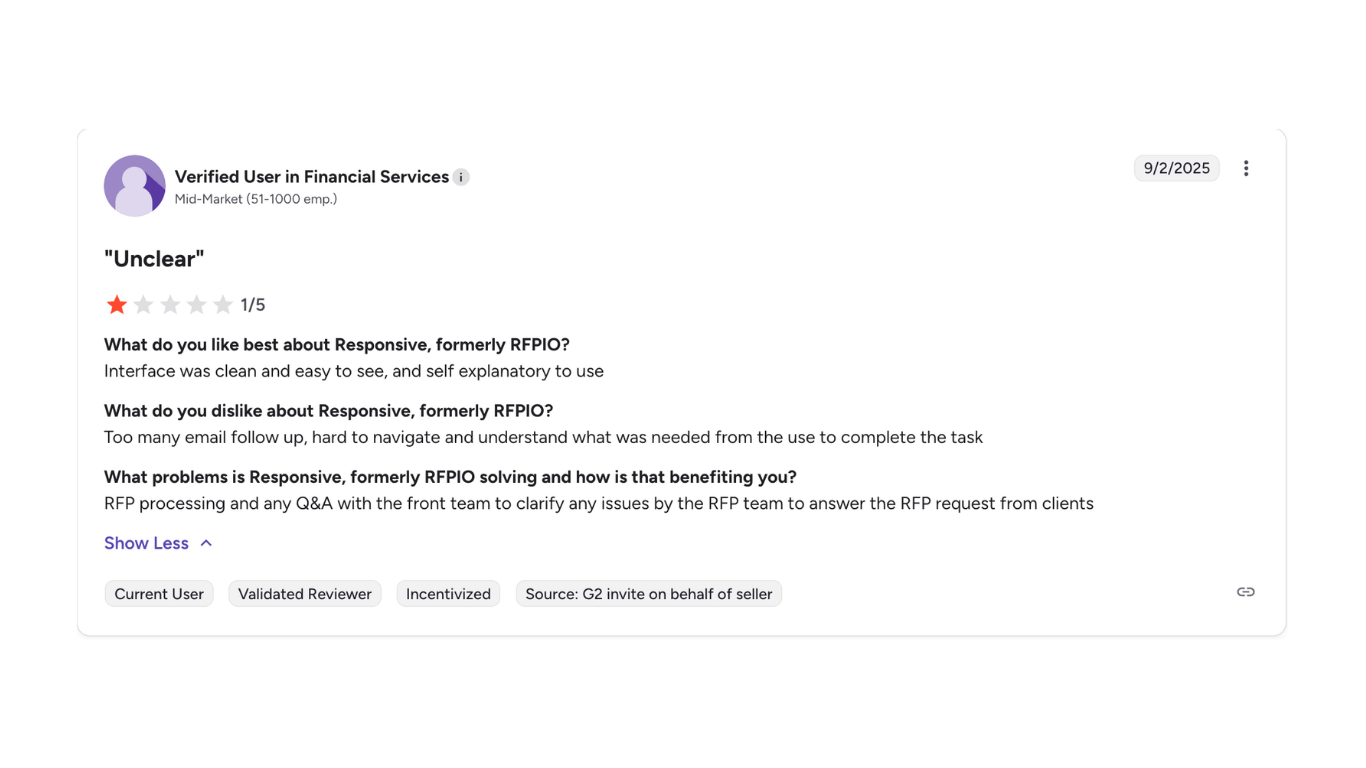
A verified G2 user in financial services for a mid-market organization encountered issues getting the platform to understand their final needs.
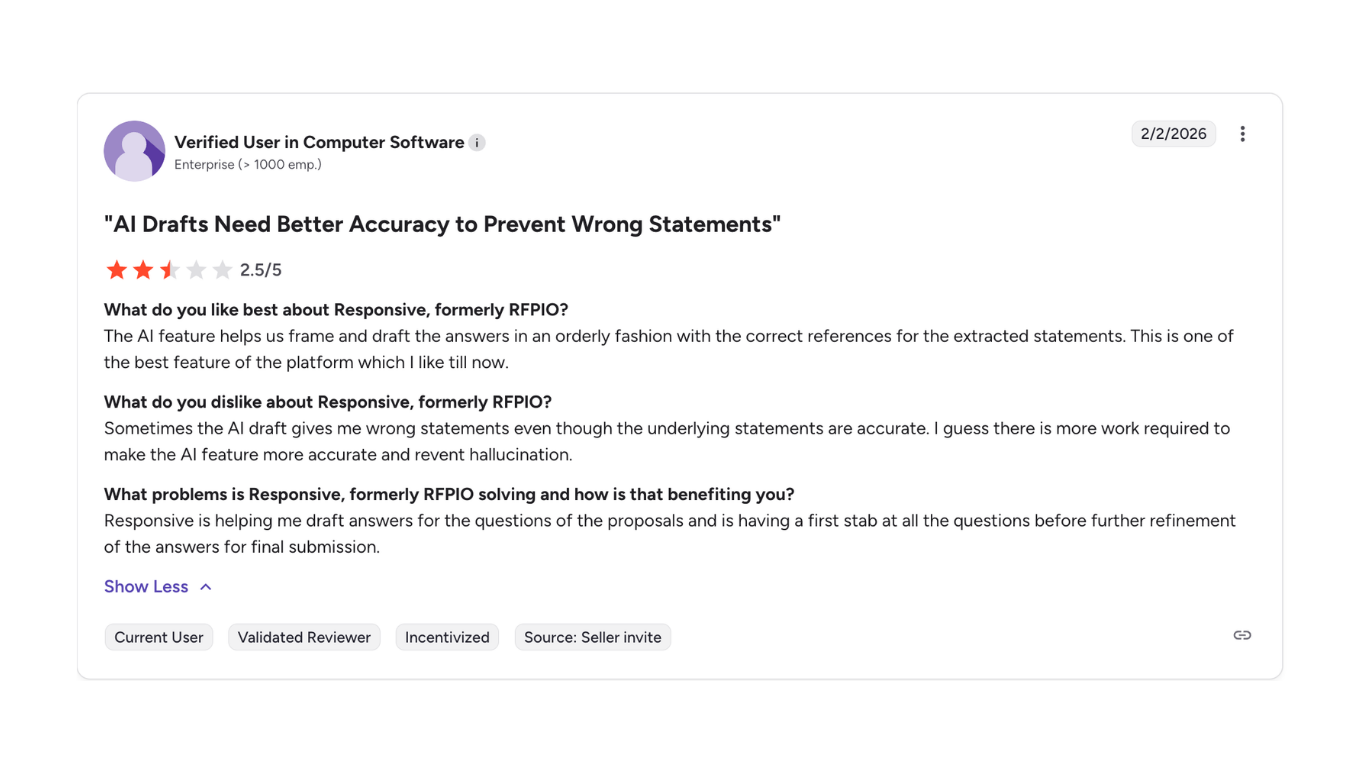
A verified user from an enterprise organization faced issues with the AI-generated answers and mentioned visible hallucinations in the tech.
Key features of Responsive
Responsive is purpose-built for high-volume, enterprise RFP response and strategic response management. Core capabilities include:
- AI-powered drafting and auto-fill: Multiple specialized AI agents handle document import, answer generation, and content scoring. The AI Writing Agent and LookUp feature surface relevant answers from the content library during active drafting.
- Centralized answer library: A single repository for approved Q&A pairs, organized with tags, categories, and ownership assignments. Effective library quality significantly improves AI fill rates.
- Workflow automation: Sophisticated task routing, SME assignment, review workflows, approval chains, and deadline tracking for multi-team projects running in parallel.
- Multi-format and multi-language support: Works with Word, Excel, PDF, and web-based procurement portals. Content translation is available for global teams on Emerging plans and above.
- Integrations: Connects to Salesforce, HubSpot, Microsoft Teams, SharePoint, Google Drive, and others. Public API access is available on Growth plans and above.
- Analytics and reporting: Content performance tracking, win-rate visibility, response time data, and team productivity metrics across the admin dashboard.
What Responsive does not do: it doesn't generate responses from call transcripts or live CRM deal context, it doesn't build pre-call briefs or deal summaries, and it doesn't pull deal-specific signals from your conversations with a specific buyer to tailor answers to that opportunity.
Responsive’s pros and cons
When Responsive works well: Mid-to-large enterprises with a dedicated bid team, high RFP volume across multiple concurrent projects, global operations requiring content translation, and an experienced Proposal Manager who can maintain and govern a large content library.
When it breaks down: Teams without dedicated proposal operations, organizations that need responses tailored to deal-specific buyer context, or anyone expecting out-of-the-box productivity without an extended setup and library-building investment.
What is the implementation and setup process for Responsive?
Responsive implementation ranges from 1–2 weeks for simple deployments to several months for large enterprises. The vendor publishes this range directly, and it reflects a genuine difference in complexity depending on how the platform is deployed.
The typical process runs through five phases:
- Kickoff and process mapping with a Responsive onboarding specialist, defining RFP workflows, governance requirements, permission structures, and integration priorities.
- Content migration ingests legacy Q&A pairs, past proposals, and approved responses into the Answer Library, assigning appropriate tags and ownership. This is the phase most responsible for timeline variance. Large enterprises with 10+ years of legacy content and 25+ product lines can spend several months on this step alone.
- Integration setup, connecting to CRM, cloud storage, and communication platforms. Most teams integrate Salesforce, Microsoft Teams, or document repositories as the primary connectors.
- Phased user onboarding, administrators, and super-users are trained first, followed by SMEs and contributors in a second phase. For advanced features, a user-dependent learning curve applies even after formal training ends.
- Library governance setup includes configuring review cycles, content ownership, and tagging conventions to ensure the library maintains quality after the implementation team steps back.
Mid-market companies typically need 4 to 8 weeks for complete setup. Large enterprises with complex, multi-team deployments may take several months for the library to be sufficiently populated for AI fill rates to reach a useful threshold.
Responsive's Professional Services team, which includes 35+ industry-certified specialists, supports the process, but this support is paid for at higher tiers rather than included in standard onboarding.
The important caveat is the same one that applies to every static-library platform: implementation completes the scaffolding, but the library becomes valuable only as it accumulates high-quality content through real submissions. Teams that expect strong AI performance from day one often find it takes months of active use before fill rates reach their potential.
SiftHub vs. Responsive
Responsive helps you manage high-volume RFP workflows at scale. SiftHub goes further; it connects the RFP to the rest of your deal, so the context your team gathered in discovery actually shows up in the response. Instead of pulling from a content library that must be built and maintained, SiftHub reads your CRM, call recordings, and emails to generate responses that reflect what this specific buyer actually cares about.
1. Live deal context vs. maintained library
Responsive generates answers from a content library that must be populated, tagged, and kept current through active governance. SiftHub connects to your live GTM stack, Gong, Salesforce, your calendars, Google Drive, and Slack, and pulls context from actual deal history when drafting responses.
- Answers reflect the buyer's industry, use case, and deal stage
- No library to build, tag, or run review cycles on
- Auto-fill rates of 70–90% from connected, always-current knowledge
What you get: RFP responses that sound like your best rep wrote them for this deal, not like someone matched a keyword to a folder.
2. Full deal orchestration vs. RFP-only
Responsive starts and ends at the questionnaire. SiftHub manages the entire deal cycle, from pre-call prep to RFP response to post-deal handover, automatically triggered by deal signals.
What you get: One platform that works across the entire deal, not just the window where an RFP lands.
3. AI that understands the RFP, not just answers it
Responsive's AI agents match incoming questions to answers stored in the content library. SiftHub reads the full intake document, including appendices, buried requirements, and deadline references scattered across pages, and generates a structured checklist of milestones, mandatory submissions, and recommended attachments before drafting begins.
- AI Suggestions decode the full scope of the RFP automatically
- Smart document recommendations pull the right attachments from your knowledge base
- One-click task creation with owners and due dates from the intake docs
- Executive summary with deal context, competitors, key risks, and instructions, ready for alignment or handoff
What you get: Less time hunting for requirements. More time submitting a response that's actually complete.
Key features of SiftHub
RFPs: Reads intake documents, generates structured checklists, and auto-fills 80–90% of RFP responses from your live, connected knowledge. Source attribution on every answer. Works natively in Google Sheets/Docs and Microsoft Excel/Word, no import/export loops.
Project tasks: Purpose-built RFP workflow management: document submissions, milestone tracking, and submission coordination in one place. Assign owners, set due dates, leave comments, and move files to your submission checklist with one click.
Deal brief builder: Auto-generated briefs for every opportunity, pulling from calls, emails, Salesforce, and enablement content. Role-specific views for AEs, SEs, CS, and leadership. Pre-call prep and handover docs are created automatically when deal signals trigger them.
Sales collateral builder: Tailored solution stories, battlecards, proposals, and POV decks generated from live CRM and call data, not generic templates.
Enterprise-grade security: SOC 2 Type II, ISO 27001, and VAPT certified. Granular RBAC, SSO, full audit trails, and region-aware data residency for healthcare, BFSI, and regulated industries.
Responsive is a capable platform for enterprises with dedicated proposal operations, high concurrent RFP volume, and the runway to invest in library governance. If your challenge is bigger, disconnected deal context, reps piecing together information from Slack the night before a call, or RFP responses that don't reflect what you learned in discovery, SiftHub is built for that.