


.avif)

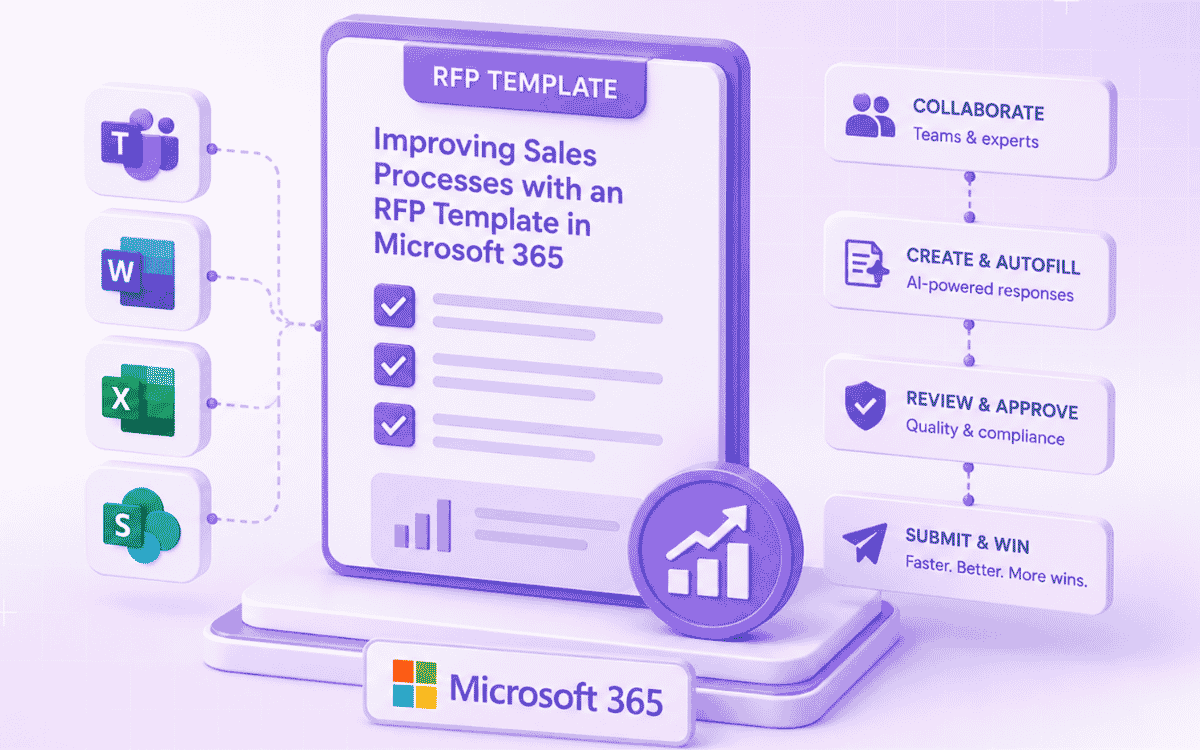
Microsoft 365 provides a strong collaboration foundation for managing RFPs, but combining it with AI-powered automation helps sales teams respond faster, maintain consistency, and improve win rates. By integrating response generation, project management, and performance insights directly into familiar Microsoft tools, organizations can streamline the entire RFP process.
- Centralizes RFP collaboration through Teams, SharePoint, Word, and Excel.
- Uses AI to generate accurate first-pass responses from verified content, reducing manual effort.
- Automates task assignments, reviews, approvals, and notifications to improve coordination.
- Provides project insights to identify bottlenecks, measure team performance, and optimize workflows.
- Enables teams to complete RFPs faster, pursue more opportunities, and improve proposal quality and win rates.
Microsoft 365 provides a strong collaboration foundation for managing RFPs, but combining it with AI-powered automation helps sales teams respond faster, maintain consistency, and improve win rates. By integrating response generation, project management, and performance insights directly into familiar Microsoft tools, organizations can streamline the entire RFP process.
- Centralizes RFP collaboration through Teams, SharePoint, Word, and Excel.
- Uses AI to generate accurate first-pass responses from verified content, reducing manual effort.
- Automates task assignments, reviews, approvals, and notifications to improve coordination.
- Provides project insights to identify bottlenecks, measure team performance, and optimize workflows.
- Enables teams to complete RFPs faster, pursue more opportunities, and improve proposal quality and win rates.
Responding to Requests for Proposals (RFPs) requires intense collaboration between sales, technical, and legal teams. The process is business-critical; it determines which opportunities you pursue, how quickly you respond, and ultimately whether you win or lose deals.
Yet anyone who has managed RFPs knows the challenges: scattered information, coordination bottlenecks, missed deadlines, and inconsistent responses that undermine your competitive position.
With Microsoft 365 becoming the central hub for teamwork, sales departments have an opportunity to transform RFP efficiency. By combining Microsoft 365's collaboration capabilities with AI-powered RFP automation and intelligent project management, organizations can complete proposals faster while improving quality and win rates.
The RFP challenge for sales managers
When responding to an RFP, sales or account managers face a complex orchestration challenge. They must gather key stakeholders across departments — sales engineers, product specialists, legal teams, and pricing analysts- and get them working together effectively. Everyone needs access to the same information: customer requirements, technical specifications, pricing guidelines, compliance documentation, and competitive intelligence.
Without structure, this process fragments. Different team members work with different levels of information, leading to misunderstandings. Critical details get lost in email threads or private chats. Approvals stall because people can't find the latest version of documents. The team struggles to adapt quickly when requirements change or competitive intelligence emerges.
The result? Missed deadlines, inconsistent responses, and lost opportunities.
How Microsoft 365 enables RFP collaboration
Microsoft 365 provides the foundation for a structured, repeatable RFP process:
- Centralized workspace: Teams collaborate in dedicated environments like Microsoft Teams, with shared access to files, conversations, and updates
- Document collaboration: Teams co-author responses in Word and Excel, with version control managed through SharePoint
- Integrated ecosystem: CRM data, pricing inputs, and supporting documents are accessible without constant tool switching
- Real-time coordination: Faster feedback, quicker decisions, and better alignment across stakeholders.
RFPs are typically delivered in Excel or Word format if they aren't in a third-party portal. With legacy RFP software, you would need to import and export documents into and out of the software application to get them auto-filled; a cumbersome process that breaks your workflow and introduces version control issues.
Modern AI RFP software changes this entirely. SiftHub's native add-ins for Microsoft Word and Excel allow you to auto-fill RFP responses without ever leaving the Microsoft environment. Generate answers directly inside the Excel spreadsheet or Word document where the RFP questions live, maintaining your natural workflow and eliminating the import/export hassle.
This native integration means:
- No file transfers between systems
- Preserved formatting and document structure
- Real-time collaboration continues in familiar Microsoft tools
- Version control is maintained through SharePoint
- Instant auto-fill across multiple tabs, sections, and pages
You stay in the Microsoft ecosystem from start to finish, with AI working invisibly in the background to accelerate response generation.
Your teams already live in Microsoft; now your RFP projects do too
For organizations that rely on Microsoft Teams for daily communication, switching to email or separate project management tools for RFP updates slows everything down. With SiftHub's Microsoft Teams notifications, every task, reminder, and update arrives exactly where collaboration happens—in Teams.
Real-time project alerts where you work
Get instant notifications in Teams about:
- New RFP assignments when questions are routed to your expertise area
- Task reminders for pending reviews or approaching deadlines
- Approval requests requiring your sign-off
- Project milestones when sections are completed or submitted
- Status updates on overall RFP progress
SMEs, reviewers, and delivery managers stay aligned without constant context switching. No more checking multiple systems to see if something is waiting for your input.
Configurable notifications that inform, never overwhelm
Admins control notification preferences to ensure teams get the right information at the right time:
- What: Choose which event types trigger notifications (assignments, deadlines, approvals)
- When: Set timing for reminders (immediate, daily digest, custom schedules)
- Who: Route notifications to specific individuals, channels, or project teams
- Frequency: Balance timely updates with notification fatigue
The result? Teams stay informed about critical RFP activities without drowning in alerts.
Note: For organizations using Slack alongside Microsoft 365, SiftHub supports Slack notifications as well, ensuring teams can work in their preferred collaboration environment.
Learn more about RFP Project Slack notifications →
RFP Template for Microsoft 365 (Process & Methodology)
In this context, an RFP template is not just a static document; it is a repeatable process that structures how teams collaborate, assign work, and deliver responses inside Microsoft 365.
Instead of starting from scratch each time, teams follow a consistent workflow that brings together communication (Teams), document management (SharePoint), and response creation (Word/Excel), enhanced by SiftHub’s automation and insights.
Here’s how this methodology works in practice:
Phase 1: Rapid project setup and team assembly
Challenge: Setting up RFP projects manually is time-consuming and inconsistent.
Solution: SiftHub's project management capabilities auto-create project structures with:
- Pre-configured sections based on RFP type (technical, security, pricing)
- Automatic team assignments based on question topics
- Integrated document templates and response libraries
- Connected Microsoft 365 workspaces (Word, Excel, SharePoint)
Result: Projects launch in minutes instead of hours, with everyone knowing their responsibilities immediately.
Phase 2: AI-powered response generation
Challenge: Drafting responses from scratch wastes valuable time and creates inconsistencies.
Solution: SiftHub's AI RFP software auto-generates first-pass answers by:
- Analyzing RFP questions to understand requirements
- Pulling verified content
- Customizing responses by industry and buyer context
- Providing source attribution for every claim
Result: Complete RFPs 8x faster with consistent, accurate responses grounded in verified company knowledge.
Phase 3: Collaborative review and refinement
Challenge: Coordinating reviews across multiple stakeholders creates bottlenecks.
Solution: Automated workflows route responses through appropriate review chains with Microsoft Teams notifications:
- Technical accuracy reviews by product specialists
- Compliance checks by legal and security teams
- Competitive positioning validation by sales leadership
- Final quality assurance before submission
Reviewers get immediate Teams alerts when responses need their input—no more chasing approvals or checking multiple systems. Everyone stays in the Microsoft ecosystem they already use daily.
Result: Faster review cycles with clear accountability, version control, and seamless collaboration.
Phase 4: Continuous improvement with insights
Challenge: Teams lack visibility into what slows them down or drives success.
Solution: SiftHub’s Project Insights turn RFP execution data into actionable intelligence.
Every RFP tells a story—who’s moving fastest, where delays occur, and how collaboration trends evolve. Project Insights make this visible in real time.
Key capabilities include:
Overview metrics at a glance:
- Projects completed and on-time delivery rates
- Questions handled per project
- Performance benchmarked against previous periods
Performance by role:
- Delivery managers ranked by project completion and turnaround time
- SMEs and contributors were evaluated on response speed and task completion
- Visibility into workload distribution and efficiency
Result: Teams identify bottlenecks early, replicate what works, and continuously improve RFP performance over time.
Explore the complete RFP methodology →
Go beyond Microsoft 365: Project insights that drive continuous improvement
While Microsoft 365 provides excellent collaboration tools, it doesn't give you the strategic visibility needed to optimize your RFP operations over time. That's where stepping outside the Microsoft ecosystem into SiftHub's project insights becomes invaluable.
Know exactly what's working and what's not
Every RFP tells a story: who's moving fastest, where delays pile up, and how collaboration is trending. With SiftHub's project insights, those stories become actionable data you can use immediately—data you simply can't get from Microsoft 365 tools alone.
Traditional RFP management leaves managers asking:
- Why did this RFP take twice as long as usual?
- Which team members consistently meet deadlines, versus which struggle?
- Where do approval bottlenecks occur most frequently?
- Are we getting faster at responding over time?
Project insights answers these questions with real data, highlighting the exact stages or contributors affecting speed. Teams can celebrate top performers and address bottlenecks early, before they derail RFP submissions.
Overview metrics at a glance
Track critical performance indicators benchmarked against previous periods:
RFP velocity:
- Projects completed this month vs. last month
- Average completion time by project type
- On-time delivery percentage
- Questions handled per project
Team capacity:
- Active projects per team member
- Workload distribution across specialists
- Utilization rates by role (sales engineers, legal, pricing)
Quality indicators:
- Review cycles required before approval
- Revision frequency by section type
- Win rates correlated with project metrics
These metrics give leadership visibility into RFP operations without micromanaging individual contributors.
Performance by role: Who's driving results?
Detailed breakdowns show exactly how different roles contribute to RFP success:
Delivery managers:
- Projects managed and completion rates
- Average turnaround time from assignment to submission
- Team coordination efficiency
- On-time delivery track record
Subject matter experts (SMEs):
- Response turnaround time by expertise area
- Revision rates (how often responses need rework)
- Contribution volume (questions answered)
- Quality scores from reviewers
Reviewers and approvers:
- Review turnaround time
- Approval cycle length
- Feedback quality (actionable vs. vague comments)
This visibility helps identify:
- Top performers who consistently deliver quality work quickly
- Training opportunities for team members struggling with specific question types
- Capacity issues where individuals are overloaded
- Process improvements based on what high performers do differently
By combining Microsoft 365's collaboration strengths with SiftHub's strategic analytics, you get both operational efficiency and the insights needed for continuous improvement.
See project insights in action →
Real-world impact: What teams achieve with RFP automation
Organizations combining Microsoft 365 collaboration with SiftHub's AI-powered RFP capabilities report immense improvements:
- 8x faster completion: RFPs that took 40 hours now complete in 5 hours, freeing sales engineers for high-value customer interactions.
- 1.5x more RFPs pursued: With faster response times, teams handle 50% more opportunities without adding headcount.
- Consistent messaging: Automated content ensures all responses align with company positioning, competitive differentiation, and approved messaging.
- Higher win rates: Teams investing saved time in strategic differentiation and customization improve proposal quality and win rates.
- Reduced stress: Eliminating last-minute scrambles and approval chaos improves team morale and reduces burnout.
- Data-driven optimization: Project insights reveal exactly where to focus improvement efforts for maximum impact.
Transform your sales process with SiftHub
Stop losing winnable deals to coordination chaos, missed deadlines, and generic responses. Microsoft 365 provides the collaboration foundation—SiftHub makes it powerful with AI automation, intelligent workflows, and actionable insights.
What you'll achieve:
- Faster responses: Auto-generate first-pass answers in minutes, not days
- Better collaboration: Keep teams aligned with Slack notifications and real-time tracking
- Smarter processes: Use project insights to identify and eliminate bottlenecks
- Higher quality: Ensure consistent, accurate responses grounded in verified knowledge
- More capacity: Handle 50% more RFPs without increasing headcount.
Book a SiftHub demo to see how leading organizations respond to RFPs 8x faster while improving quality and win rates.
What you'll see in your demo:
- Live demonstration of RFP auto-fill working inside Microsoft 365
- Slack notifications keep teams aligned in real-time
- Project insights dashboards showing exactly where efficiency improves
- RFP software managing your response content
- Automated workflows route tasks to the right experts
- Before/after comparison of RFP response times
Schedule your personalized demo →